Create a ‘holding tank’ for your messy digital photos in the folder structure of your digital photo hub. Your ‘to-be-organized’ folder is your ‘dumping ground’ for all the images you bring in from devices, camera cards, the scanner, etc.
Create Some Structure in Your Life
Now that you’ve chosen your digital photo hub, let’s create some structure. We recommend a folder structure that is scalable, and easy to understand.
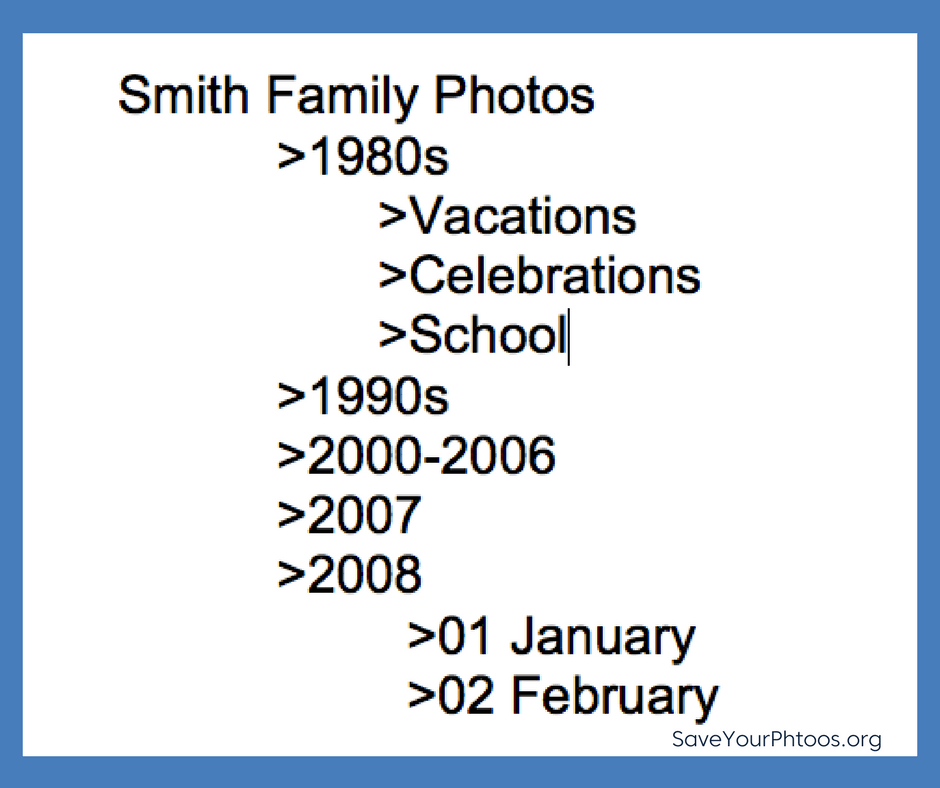
For example, a dated folder structure is predictable and easy to maintain because today’s digital images have dates embedded. Themed folders with no ‘dated’ structure work better for old scanned photos that are hard to date. Use a numerical file name for your folders which allows your computer to sort your folders in date order. Here is an example of a scalable folder structure that incorporates both:
Create a Holding Tank: To-Be-Organized
Eventually, your sorted images will go into this folder structure, but first, we need to create a ‘holding tank’. This one folder in your hub will denote images that need sorting. Your ‘to-be-organized’ folder is your ‘dumping ground’ for all the images you bring in from devices, camera cards, the scanner, etc.
Start to Sort
Once you have your structure in place, you can start pulling in images from all your devices. Next week we’ll give you some specific tips to help streamline this work so don’t jump in just yet.
Stand Alone File Structure
One final thought about the importance of this structure. You will notice that we haven’t introduced any photo organizing software yet. We believe this structure is a ‘friendly’ option for everyone and ensures that your workflow is software independent. If you aren’t currently using a software program to organize your photos, the added learning curve may slow you down or paralyze you. We’ll teach you how to organize your photos without a specific software and we’ll leave the decision to introduce software up to you.
Sign up today for more great photo organizing tips directly in your email box.
We also invite you to visit our sister blog The Photo Organizers for more tips and in-depth knowledge from some of the top photo organizing industry professionals. To find a photo organizer near you, visit the Association of Personal Photo Organizers.



Leave a Reply