Save Your Photos

  • Home
  • Blog
  • Disaster Help
    • Disaster Resources
    • Hurricane Harvey Photo Recovery
    • Hurricane Irma Photo Recovery
  • Who We Are
    • Save Your Photos Group
    • The Photo Organizers Blog
    • Association of Personal Photo Organizers
  • Sponsors
    • How To Become A Corporate Sponsor

Sep 22 2017

Calling All Photo Organizers: What Type of Genealogist Are You?

Calling All Photo Organizers: What Type of Genealogist Are You?

Every one of us who is organizing and saving our photos is, in some sense, a genealogist. Which type are you? This post is sponsored by  Vivid-Pix™, a proud sponsor of 2017 Save Your Photos Month.

Calling All Photo Organizers: What Type of Genealogist Are You? | SaveYourPhotos.org


Genealogists make a career capturing a story so that future generations can learn about us. Even though there may be photos that we don’t want to be remembered, those are the ones with the best stories to be told! Unfortunately, not every family has a genealogist, but every family wants to share their memories with generations to come.


Each One of Us Is A Genealogist

I never thought of myself as a genealogist, but in the world of old family photos, memorabilia, connecting with our past, and ensuring treasured memories are shared with future generations, we have all become “genealogists.”  We all have a different perspective on how we will fulfill this responsibility.  As we used to print everything, these prints and documents (news clippings, etc) are fading.

We need to scan and revive our history so that it will remain available in the digital world – and not fade to oblivion.

But, I’m not a professional, just your everyday member of a family, so the idea of tackling this task seems overwhelming and costly.


Awesome or Awful?

Completing this task doesn’t have to be awful – it can actually be a lot of fun.  I’ve had a great time learning about my past and reliving the moments with loved ones.  AND, easy-to-use technology is making it, well, easy to accomplish the scanning, restoring, and sharing of your precious memories and legacy.

A picture says a thousand words and video speaks at 30 frames per second.  Enjoy these videos on how 4 types of “genealogists” are solving their journeys – and having fun!


The Family Historian

Every life is a story worth telling and remembering.  It isn’t just history – it’s family.

Calling All Photo Organizers: What Type of Genealogist Are You? | SaveYourPhotos.org
Photo Credit: Vivid-Pix


The Creative

Explore and be creative with your craft or hobby.

Calling All Photo Organizers: What Type of Genealogist Are You? | SaveYourPhotos.org
Photo Credit: Vivid-Pix


The Memory Keeper

Be Prepared – Not Sorry.  Disasters large and small happen anytime.

Calling All Photo Organizers: What Type of Genealogist Are You? | SaveYourPhotos.org
Photo Credit: Vivid-Pix


The Connector

Collect Memories.  Connect Lives.

Calling All Photo Organizers: What Type of Genealogist Are You? | SaveYourPhotos.org
Photo Credit: Vivid-Pix


Enjoy!


Rick Voight of Vivid-PixRick Voight is a lifelong snapshooter, who has been in the imaging business for a few decades. “Rick, Randy, and a few excellent people” created Vivid-Pix™ to make it easy for customers to get and share better photos. Vivid-Pix patented and proprietary software’s follow the slogan created a century ago – “you press the button, we do the rest”.

At HP, Rick helped create the Retail Publishing Solutions division – connecting home, store and online – delivering photos and gifts in minutes, in an hour, and in a few days. At Kodak, he enjoyed working with just about every class-of-trade, developed relations and promotions with local, regional, national, and international sporting teams, theme parks, and organizations; creating new technologies and revenues.

Rick is a volunteer and board member working with multiple non-profit organizations.

Calling All Photo Organizers: What Type of Genealogist Are You? | SaveYourPhotos.org


Written by Andi Willis · Categorized: Photo Organization · Tagged: family history, genealogy, video, Vivid-Pix

Sep 20 2017

Save Your Photos: Sort Your Digital Photos

Save Your Photos: Sort Your Digital Photos

Once you “backup the mess,” the time has come to sort your digital photos.

Save Your Photos: Sort Digital Photos | SaveYourPhotos.org

Start With A Backup

One more step before you start collecting your images. Let’s get a backup in place. We’ll elaborate on a healthy, long-term backup strategy in a few days. For now, you want to have an external hard drive setup to backup your mess.

Yes, that right. Let’s backup the chaos!

We recommend an automatic backup to your external drive, and you want this in place before you start moving digital photos.

Now you can proceed by collecting images from all the devices and locations you indicated during your ‘hunt and gather’ inventory stage. You may find it helpful to work in stages, one device at a time. Check each device off your list so you don’t forget anything.


The ‘To Organize’ Folder

As you bring each set of digital photos into your ‘to organize’ folder, keep events or months together. For example, don’t just dump 1,475 images from your camera roll into your folder. Use your smartphone’s built-in app to identify groupings like months, events or collections.

Once you have a group of photos in your ‘to organize’ folder, you want to give the images a quick review and remove all photos that don’t need to be in your collection. Pictures of a receipt for business and the lunch photo you posted on Instagram are examples of the clutter you want to get rid of right away. Get rid of anything that you know for sure, isn’t a ‘keeper.’  

Before you organize your digital photos, backup the mess! #saveyourphotos Click To Tweet

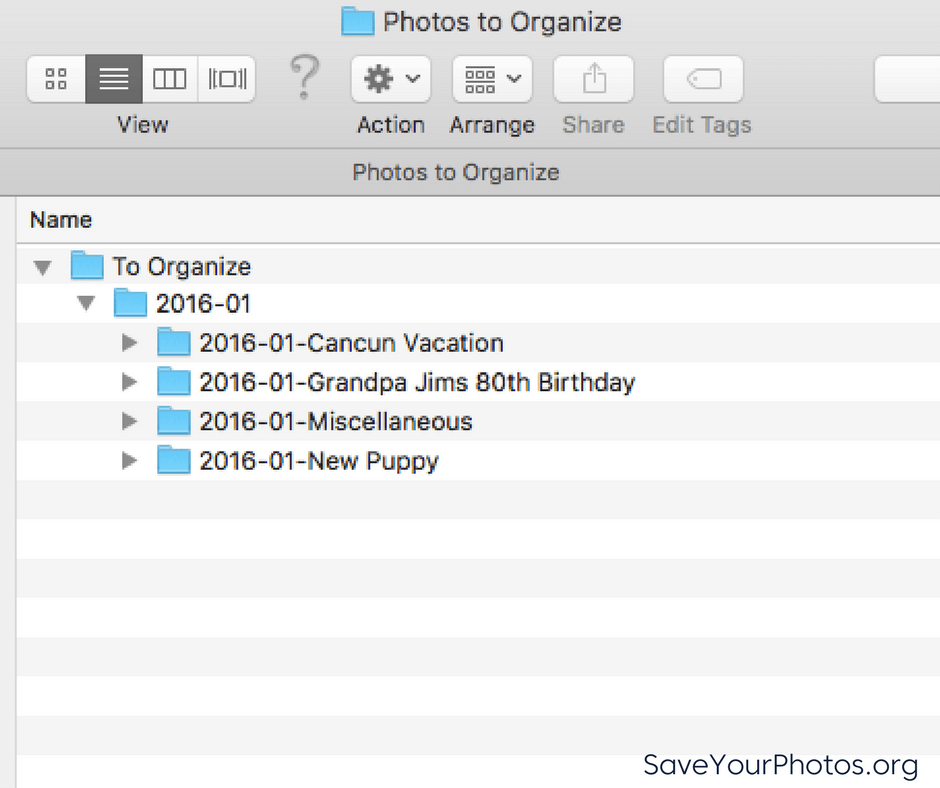
Next, create a folder and give the folder a name that represents the group of photos that will go into it. Your folder name should begin with a numeric sequence that represents the year first, followed by the month. An example might be 2016-01 for January 2016. Inside that folder; you can create themed or event folders to break it down further if you want, depending on your volume of photos. The name of that folder should begin with a numeric sequence that represents the year followed by the month, followed by the event or theme.

Here is an example of what this looks like.

Save Your Photos: Sort Digital Photos | SaveYourPhotos.org

Renaming Digital Photos

You can take this one step further by renaming each photo inside the folders. You can work in batches without the use of any additional software, and you’ll want to include ‘who, what, where’ in your filename. When you batch rename photos in your folder, your system assigns a numerical appendage to your image filename. Ultimately, each image ends up with a unique filename.

Here is an example of the filenames for one of the folders listed above.

2016-01-Grandpa Jim’s 80th Birthday
   >2016-01-25-Birthday-Jim Smith-Florida_001.jpg
   >2016-01-25-Birthday-Jim Smith-Florida_002.jpg
   >2016-01-25-Birthday-Jim Smith-Florida_003.jpg
   >2016-01-25-Birthday-Jim Smith-Florida_004.jpg
   >2016-01-25-Birthday-Jim Smith-Florida_005.jpg

Once you completed this step, it’s time to move your newly organized folder out of the ‘to organize’ folder and into its rightful place in the main folder structure of your central hub.

If you have to take a break, return to your ‘to organize’ photos and continue working. With this system, you can quickly identify where you have left off.

Repeat until all of your photos are in your hub. Next week we’ll discuss quick ways to eliminate duplicates.


Sign up today for more great photo organizing tips directly in your email box.

We also invite you to visit our sister blog The Photo Organizers for more tips and in-depth knowledge from some of the top photo organizing industry professionals. To find a photo organizer near you, visit the Association of Personal Photo Organizers.

Written by Andi Willis · Categorized: Photo Organization · Tagged: digital photos, folder structure, how to organise digital photos, how to organize digital photos, how to sort digital photos

Sep 15 2017

Crafting a Legacy: Telling Your Story in Photos

Crafting a Legacy: Telling Your Story in Photos

This blog post is sponsored by Forever, the only full-resolution online storage guaranteed for your lifetime plus 100 years. Forever is also a Save Your Photos month sponsor.

Crafting A Legacy: Telling Your Story In Photos | SaveYourPhotos.org

I’m “that” relative. You know, the one with the camera at every function, snapping tons of photos that may or may not ever be seen. I’ve been known to say, “You can smile and be cute or make a face, I’m taking the picture either way!”

I’m THE resource when a picture is needed. The one that can be counted on to capture the event.  A historian of sorts with pictures all over the place. My years behind the lens have taught me a valuable lesson- there is always a story to be told and the person to best tell it is the subject and not others.


Leaving A Legacy Versus Crafting A Legacy

This lesson was lived out in my life recently when I was asked to complete an almost emotionally impossible task. Would I create a photo book using my mom’s pictures to chronicle my deceased sister’s life? My younger sister, Tina, fought a valiant and brave battle against cancer. She left two incredible children, who are now young adults, and a husband.  My mom wanted to give a memory book my sister’s new grandbaby. Momma handed me a traditional scrapbook she had begun along with a stack of pictures and said, “Go for it.”

Organizing her pictures brought a litany of questions…most without answers.  How do you encapsulate a life in a mere few pages? Which stories were to be shared and how much of each? What stories were for my mom to tell, and which ones belonged to Tina’s family? Who were the people in some of the photos? What were their names and were they really friends? How to present a grandmother this baby will never know in such a way she will never forget?

These questions brought me to the idea of crafting a legacy…writing my own story.

There is a lot written about “Leaving a Legacy” but very little about crafting a legacy. Crafting your legacy to me means the deliberate telling of your own story, in your words with your thoughts. Sharing with others your gifts, your struggles, your talents and your funny stories. It’s not being vain, proud, or self-centered. It’s about being real, honest, transparent, brave and fun! It’s also, overwhelming.

So, how to begin?

 Crafting A Legacy: Telling Your Story In Photos | SaveYourPhotos.org

Make Your Plan

Start with the idea that you have 20 blank pages to fill. Would you want your book to read like a comedy, a historical novel, a genealogist’s treasure trove, or written to future grandchildren? How far back do you want to go? Will it be a baby book to adult or simply chronicle a struggle that you have overcome or are going through? Should it be themed with your travels, your artwork, your day to day activities, or will it be a highlight reel of your blessings? The joy of crafting your legacy is that you get to choose!


Get Your Photos in One Spot

Pull out hard drives, boxes of pictures, VHS tapes, flash drives, floppy disks, framed pictures, scrapbooks that you may want to use get them and get them all in one place. I know this may seem overwhelming at first, but it is so freeing once you get started. Trust the process, it works!


Divide By Decade Or Themes (Your Choice)

It took you a long time to get where you are, so don’t let the details cripple you!

For your printed photos, divide by decades or even bigger chunks of time.  Birth- Elementary School. Junior High- College. First job –kids. Or, break it down by events-family vacations, holidays, trips, sports, etc.

Decide to work on this project in specific amounts of time so that you continue and don’t give up in frustration. For example, 15 minutes of “me” time daily.

As you look at old photos you will remember, laugh, cry, and wonder where the time has gone. Jot down stories, notes and begin your “filtering”. You have permission to get rid of pictures of people who mean nothing to you or whose name you can’t remember. Toss blurry and out of focus photos along with doubles (unless you make a specific pile with a name to be given away shortly). Declutter your life as you go, but write notes on the stories.

Tell your story, share your pictures, craft your legacy. It’s the sweetest and most rewarding journey you’ll ever get to take. Click To Tweet


Choose a Permanent Home for Your Digital Photos

Having one place to preserve all my memories and family stories was the first step to my peace of mind solution. When you are ready to digitize, consider the cost, quality, long term storage guarantees, and data migration. For me, that solution was the company Forever.  They offer a free account to try out and then permanent storage options that fit your needs. And with Forever, you pay one time and you own your storage, forever. You do not need to ever pay any additional fees. I trust Forever to be around 100 years from now because when I purchased my Forever account, much of that money went into a fund that will continue to pay for the maintenance of my photos over time.  In addition, I never need to worry about my family knowing the correct passwords or where the pictures are, because Forever is generational! I own my account so it’s like insurance for my photos!

They also have privacy and legacy options for my albums. The choices are: Private (only I see), Friends and Family (my friends and family see) and Public (anyone can see). They also have preservation settings that will allow you to make portions of your account public so your legacy will live on.  So, in my sister’s case, I made her albums public so folks can search by her name and see her pictures and the stories of her life.

In Forever, I was also able to create and print a digital photo book of the photos in my Forever account. Do your research and choose the option best for you.  Remember free online services come with lots of strings attached. I have learned that those free photo sites are not a solution for my family memories.

 Forever | Save Your Photos Month 2017 Sponsor

Tell Your Story…Craft Your Legacy

You’ve been inspired by old pictures and the stories you have remembered. You have decided on how you want to tell your story. Now comes the time to start crafting a legacy! Will you create an online account, a digital storybook or a traditional scrapbook? There are benefits to each, but my current favorite is the digital story/photo book. I have five children and three grandchildren, so the option of making it once and printing multiple copies appeals to me! The end format is not as important as the gathering and recording of the tales.

If this still seems overwhelming and you are thinking, “Yeah, but where do I start?,” let’s go back to middle school English class. Ask yourself (and answer) the 5 W’s and an H. Who, What, Where, Why, When, and How.

Crafting A Legacy: Telling Your Story In Photos | SaveYourPhotos.org

Who

  • Who are you?
  • Who are your parents?
  • Who are your siblings?
  • Who raised you?
  • Who were the influences in your life?
  • Who encouraged you?
  • Who are your brothers and sisters?
  • Who are your children?
  • Who are you writing to /for?
  • Who was your best friend growing up?

What

  • What is your favorite color?
  • What is your favorite place to vacation, spend time, to be?
  • What do you enjoy in your free time?
  • What was your job?
  • What skills and talents do you possess?
  • What would you like to learn?
  • What would you do differently?
  • What are your favorite foods?
  • What circumstances have molded and shaped you into the person you are?
  • What adversity have you overcome?
  • What did you get in trouble most for as a child?

Where

  • Where were you born?
  • Where have you lived?
  • Where is your favorite “happy” place?
  • Where have you traveled?
  • Where would you like to travel?
  • Where did you meet your significant other?
  • Where to you like to spend time?

Why

  • Why are you writing?
  • Why did you stay in a tough spot (marriage, job, career, country, etc.)?
  • Why did you decide to leave a tough spot?
  • Why are you the way you are?

When

  • When were you born?
  • When did you embrace your faith?
  • When did you decide to have children?
  • When did you decide not to have children?
  • When did you decide to open a business, work for yourself, not work for a company, not work for yourself?
  • When did you find out you were adopted?

How

  • How do you live on a day to day basis?
  • How did others help you along your journey?
  • How has your faith (or lack of) influenced who you have become or how you live?
  • How did you get to this country/state?

Crafting A Legacy: Telling Your Story In Photos | SaveYourPhotos.org

This isn’t an exhaustive list of questions, but an encouragement to take action, to get started and to begin crafting a legacy.  You have a story to tell, only you can tell it, and only you can give it justice. Tell your story, share your pictures, craft your legacy. It’s the sweetest and most rewarding journey you’ll ever get to take.


Sign up today for more great photo organizing tips directly in your email box.

We also invite you to visit our sister blog The Photo Organizers for more tips and in-depth knowledge from some of the top photo organizing industry professionals. To find a photo organizer near you, visit the Association of Personal Photo Organizers.


Kathy Lanham of Forever.comKathy Lanham is a mother of 5 (grandmother of 3!)  She has 20+ years’ experience in the memory keeping field helping folks collect, organize, and celebrate their photos. She is a photographer and a Senior Lead Ambassador with Forever. She enjoys travel, reading, and eating out! She lives in KY with her husband Mike.


Crafting A Legacy: Telling Your Story In Photos | SaveYourPhotos.org


Written by Andi Willis · Categorized: Creating Memories · Tagged: creating a legacy, forever, how to make a photo book, photo album, photo book, tell your story

Sep 13 2017

A Green(er) Memory Footprint: Helping the Environment While Preserving Your Photos

A Green(er) Memory Footprint: Helping the Environment While Preserving Your Photos

I was having coffee with a friend who asked me what to do about her “memory footprint.”   Memory footprint?  Huh?  That was new a term to me.

She went on to explain that she is the family historian.  Collecting family photos, scrapbooking and watching old home movies are her favorite things to do in her spare time.  (No wonder I like this lady!  We have a lot in common!)  But as her collection grows and technology changes, she is beginning to wonder about the impact it has on the environment and what she can do to reduce her, as she calls it, “memory footprint.”

Specifically, she asked about what to do with old VHS tapes, CDs and DVDs once they had been converted to digital format.  What about old photos and slides, too?  What’s the best practice for preserving printed and digital photos?  Thankfully, as a personal photo organizer and keeper of my family’s…”memory footprint,” I had already traveled the path to a greener footprint for managing memories and could help my friend with answers to her questions and more.

Start Local 

Recycling practices vary based on the local sanitation company.  My friend and I live in the same city and our local service allows digitally printed photos to be put in the recycling bin because they recycle mixed and glossy papers.  Unfortunately, the other stuff—this includes negatives, VHS, CDs, DVDs, films, slides, etc—cannot be recycled locally and must go in the traditional trash.  If this is your only option, please consider shredding items before trashing to protect your privacy.

Tear Test

You’ll notice that I said “digitally printed photos” can be recycled.   Chances are your more recent photos printed at a big-box store or a pharmacy are digital prints.  Digital prints can be recycled because images captured by digital cameras do not require photographic chemicals to print.  There is a quick test that you can do to determine if the photo can be recycled according to Earth911.   Simply tear the photograph.  If it rips cleanly, you have a digital print for the recycling bin.  Or, if it rips in layers, you have an older photo which cannot be added to the recycling bin.

A Green(er) Memory Footprint: Helping the Environment While Preserving Your Photos | SaveYourPhotos.org
The tear test
Can you recycle your photos? Do the tear test to find out! #saveyourphotos Click To Tweet

Recycle Your Memory Footprint

I have found a responsible and secure resource for disposing of technotrash—including CDs, DVDs, VHS tapes, black-and-white film (e.g. photographic film negatives, instant film, 8mm, etc.).  They even take floppy-disks!   Simply box it up and ship it to GreenDisk.com where your obsolete materials will be safely and securely destroyed or recycled.  There is a fee for recycling these items, but the benefit is that the chemicals and non-biodegradable items stay out of the landfills and makes our world a little greener.

My friend was so excited because this removed a big box of technotrash from the corner of her office, giving her room for a new comfy chair.

A Green(er) Memory Footprint: Helping the Environment While Preserving Your Photos | SaveYourPhotos.org

Reduce Your Memory Footprint

My friend admitted that she doesn’t plan to eliminate her photo collection entirely and that she wants options for reducing her use of traditional printed materials.  We talked about how to store photos, share digital photos and find eco-friendly print materials.

Use Archival-Quality Materials

Once you have narrowed down your collection and properly disposed of unwanted materials, your collection should be stored in archival-quality boxes or albums to protect it for years to come.  Additionally, the production of the archival-quality materials uses fewer chemicals making it more environmentally friendly and easier to recycle both the production by-products and the paper itself.

Share Digitally

The digital age has made it easier than ever to store and share your photo collection.  Old photos and videos can be scanned and added to your digital collection.   A few ideas for sharing digital images include:

Forever.com offers permanent, private and secure storage with convenient family sharing.

Digital frames with Wi-Fi, such as NixPlay, make it easy to share digital photos from your phone to anywhere in the world to a high-resolution display.

Electronic greetings can be personalized with your photos and sent using email.  Smilebox has some great designs for greetings, invitations, collages and slideshows.

Eco-friendly Printing

For those favorite photos, look for products which include eco-friendly materials.  For example, MPIX offers papers with post-consumer recycled content for greeting cards.  Additionally, their photo books and bamboo prints are Forest Stewardship Council certified to ensure that you are purchasing environmentally appropriate materials.

Reuse 

We also brainstormed some ideas to reuse her materials.  After all, maybe those old materials still have some life in them.  Consider sharing prints with the other people in the picture.  Or, look around on Pinterest at all the fun DIY projects for repurposing old slides, slide carousels and movie reels.  My friend isn’t quite the DIY crafter-type (I even think she rolled her eyes at me!), I suggested she consider posting her collection on Freecycle or Ebay to make it available to crafters and artists.  Remember one man’s trash is another man’s treasure!  For example, here are a couple of fun upcycled items I found on Etsy.

A Green(er) Memory Footprint: Helping the Environment While Preserving Your Photos | SaveYourPhotos.org

Movie Lover Clock, by Pixel This


A Green(er) Memory Footprint: Helping the Environment While Preserving Your Photos | SaveYourPhotos.org

Recycled Slide Carousel, by Mollydog Designs

Whether you want to recycle, reduce or reuse your photos, slides and videos, this list will help you shift to a green(er) way to save, share and enjoy your “memory footprint.”

If you have a resource that you love or know of a service within the evolving “green economy,” please share in the comments.  If you have questions, need to find eco-friendly solutions or need help eliminating a pile of technotrash from the corner of your office, contact the Association of Personal Photo Organizers (APPO) to find a photo organizer near you.


Andrea Sims of Your Story. Share It!
Andrea Sims is a certified member of APPO and the owner of Your Story. Share It!    She is passionate about celebrating memories with photos.  After many years of scrapbooking as a hobby and volunteering with school yearbook staffs—first as a student and later as a parent—she decided to become a photo organizer.  Being a photo organizer gives her the opportunity to help other people enjoy their photos and share their stories—all from a green(er) perspective.


A Green(er) Memory Footprint: Helping the Environment While Preserving Your Photos | SaveYourPhotos.org

Written by Andi Willis · Categorized: Photo Organization · Tagged: memory footprint, recycle photos, recycle VHS, recycling photographs

Sep 07 2017

What To Do When Disaster Strikes Your Photos

What To Do When Disaster Strikes Your Photos

This article was first published on Calgary Photo Solutions. Thank you to Kathy Stone for sharing this important information with us.

What To Do When Disaster Strikes Your Photos | SaveYourPhotos.org


“When our house flooded, it wasn’t losing the TV or furniture that bothered us most, it was the memories. We captured our memories in photos and although our thoughts could conjure up moments that were special, losing the physical picture was beyond traumatic to us.”   – Martha K., resident of High River, AB (June 2013)

Floods, tornados, hurricanes, and wildfires seem to be occurring with greater frequency in recent years, and often our priceless photos and albums are the victims of these events. Or our photos are damaged by more mundane events such as leaky pipes, burst hot water heaters, and sewer backups. When these events occur, you need help and information right away.

This post provides tips for what to do when disaster strikes so you can reduce damage and increase the chances of salvaging your photos and albums. If you suddenly find yourself faced with wet, damaged photos and albums, here’s what you need to know to reduce damage to your photos and recover your precious images once the emergency is over.

What To Do When Disaster Strikes Your Photos | SaveYourPhotos.org

What NOT to Do When Disaster Strikes

First, it’s important to know what NOT to do:

  1. Don’t throw away your wet, muddy or damaged photos or albums!
  2. Don’t dry photos in their albums, in envelopes, or stacked together.
  3. Don’t dry photos in a place with bright sunlight, wind, or dust.
  4. Don’t dry wet photos without rinsing off mud and debris.
  5. Don’t rub the photo surface with your fingers or a cloth.
  6. Don’t pry wet or dry photos apart.
  7. Don’t use cleaning solvents of any kind on photos.
  8. Don’t use heat sources to dry photos (hairdryer, oven, microwave, etc.)
  9. Don’t dry photos on printed newspapers or similar materials.


What To Do When Disaster Strikes Your Photos | SaveYourPhotos.org


If your photos were damaged in storm, you need to follow this advice. #saveyourphotos Click To Tweet

First Things First

What to do first:

  1. Wear gloves and a mask when handling wet photos and albums – particularly in cases of natural disasters or sewage back up.  
  2. Remove wet envelopes, folders, album covers and dispose of them.
  3. Remove plastic covers and sleeves from photos where possible.
  4. Put your wet photos and albums in plastic bags and freeze them. If possible, layer wax paper between individual photos or between album pages.
  5. If you don’t have access to a freezer, put photos and albums in sealed plastic bags to try and keep them from drying out completely. These must be cleaned within 48 hours, as mold will begin to grow.
  6. Focus first on the photos that you know have no digital backup or negatives.  
  7. Focus on the photos with the least amount of damage first.
  8. If you have very old heritage photos, you may want to contact a professional photo restoration service. A Certified Photo Organizer can assist you in finding one.
  9. Members of the Association of Personal Photo Organizers can help you with recovering your photos.  Locate one in your area here.

What To Do When Disaster Strikes Your Photos | SaveYourPhotos.org

How to Clean Your Photos

  1. Gather the supplies and materials needed. (see below)
  2. Take safety precautions. (see below)
  3. Plan the order of cleaning and drying your photos: wet first, then frozen, then dry.  Framed photos first, then prints with no negatives or damaged negatives, negatives, then all other prints.
  4. Thaw frozen photos in small batches at room temperature out of plastic bags.
  5. Scan or photograph photos that are stuck to glass or album pages, or that have significant damage BEFORE you clean them.
  6. Remove photos from albums or glass frames – this may require soaking in clean water.
  7. If photos are stuck together, soak in water until they can be separated.
  8. Test your cleaning process on a few, less important photos first – do this for each kind of printed photo  
  9. Rinse photos one at a time in clean, room temperature tap water. Gently rub any stuck dirt or debris with a soft brush, or swish in water if the emulsion is damaged.
  10. Once dirt and debris are removed, swish the photo in clean, room temperature distilled water.
  11. Change the water frequently.
  12. Shake off excess water, and lay prints flat on layers of clean newsprint to dry. Photos can also be hung by a corner with a plastic clip to dry.
  13. Wait until prints are completely dry before stacking them.
  14. Once dry, flatten under heavy books.
  15. Scan the dry photos to create a digital back up copy.

What To Do When Disaster Strikes Your Photos | SaveYourPhotos.org

Frequently Asked Questions

What does freezing the photos do?

If you don’t have time to deal with your photos and albums immediately, freezing them halts the biggest threat to the destruction of photos – mold.  Freezing doesn’t kill the mold, but it stops it from progressing. When you thaw out the photos to clean, the mold will start to grow again, so thaw your photos in manageable batches, not all at once.

Can I keep photos I have cleaned and dried?

It depends. There is no way to kill the mold on photos. It will dry and particles may stay on your photos. Placed in another situation with moisture (e.g. a humid house), the mold may grow again. I recommend that you scan the cleaned photos and dispose of the prints.

If I follow these steps, will I be able to save all my photos?

These tips are your best chance to salvage your photos and albums, but there are no guarantees. Some photos and albums survive floods with surprisingly little damage, some may be completely destroyed, and others will be somewhere in between. In addition, some types of photos are more easily damaged by water than others; Inkjet prints, for example, usually do not survive any time submerged in water. Fortunately, however, Inkjet prints have usually been printed from digital files, and can hopefully be recovered from the original file.

Resources and References

For detailed information on the cleaning process, please consult the following reference documents:

“Recommendations for cleaning and restoring damaged photos and albums.”  FujiFilm Corporation  

“A Consumer Guide for the Recovery of Water-Damaged Traditional and Digital Prints.”  Image Permanence Institute with support from Creative Memories

“Photo Recovery” FlipPal Mobile Scanners

More information on saving damaged photos can be found on Calgary Photo Solutions Pinterest Board

Materials and Supplies

  • Work tables
  • Gloves (latex or nitrile), rubber gloves, cotton gloves
  • Respiratory masks
  • Tyvek® suit or old clothing
  • Safety goggles
  • Plastic bins
  • Freezer bags, plastic bags, and garbage bags
  • Wax paper
  • Scissors, utility knife, pliers
  • Soft brushes
  • Microfiber cloths
  • Cotton swabs, cotton balls
  • Spatula (plastic or rubber)
  • Distilled water
  • Drying tables or hanging racks
  • Plastic clothes pins or plastic-coated clips
  • Clothes lines
  • Blotting paper, clean newsprint, plain paper towels
  • Masking tape, note paper, paper clips (plastic)
  • Permanent ink markers (such as sharpies), pencils
  • Empty photo boxes or shoeboxes
  • Negative envelopes
  • Scanner
  • Camera
  • Glass or Plexiglas
  • Heavy books

What To Do When Disaster Strikes Your Photos | SaveYourPhotos.org

Safety Precautions

  • Wear gloves – rubber gloves for handling bags and containers of wet photos, taking albums apart, etc.; and surgical gloves for cleaning.
  • Protect your clothing.
  • Wear a mask.
  • Wear goggles.
  • Work in a well-ventilated area away from children and pets.

© Calgary Photo Solutions, 2017


Sign up today for more great photo organizing tips directly in your email box.

We also invite you to visit our sister blog The Photo Organizers for more tips and in-depth knowledge from some of the top photo organizing industry professionals. To find a photo organizer near you, visit the Association of Personal Photo Organizers.


Kathy Stone of Calgary Photo SolutionsKathy Stone, a Certified Personal Photo Organizer, founded Calgary Photo Solutions to help people preserve their photos and stories by providing a range of photo organizing services.  Kathy has been helping people organize and enjoy their printed and digital photos for over 17 years.  During severe flooding in Southern Alberta in 2013, Kathy saved thousands of photos for several families.  She is a Certified Adult Educator, and has presented at the Association of Personal Photo Organizers Conferences in 2014 and 2016, provided digital and print photo training to numerous groups and individuals, and spoken to individuals and organizations about the importance of photo preservation


What To Do When Disaster Strikes Your Photos | SaveYourPhotos.org

Written by Andi Willis · Categorized: Photo Restoration, Safeguard · Tagged: cleaning photos, disaster, photo recovery, saving photos

  • « Previous Page
  • 1
  • …
  • 3
  • 4
  • 5
  • 6
  • 7
  • 8
  • Next Page »

© Copyright 2017 Association of Personal Photo Organizers · All Rights Reserved · Privacy Policy