
Save Your Photos

  • Home
  • Blog
  • Disaster Help
    • Disaster Resources
    • Hurricane Harvey Photo Recovery
    • Hurricane Irma Photo Recovery
  • Who We Are
    • Save Your Photos Group
    • The Photo Organizers Blog
    • Association of Personal Photo Organizers
  • Sponsors
    • How To Become A Corporate Sponsor

Aug 09 2017

Save Your Photos: Create A Family Timeline

Save Your Photos: Create A Family Timeline

Preparing a family timeline aids in the sorting process as you begin to tackle your photo and video collection. Begin by plotting important milestones like marriage and birth dates.
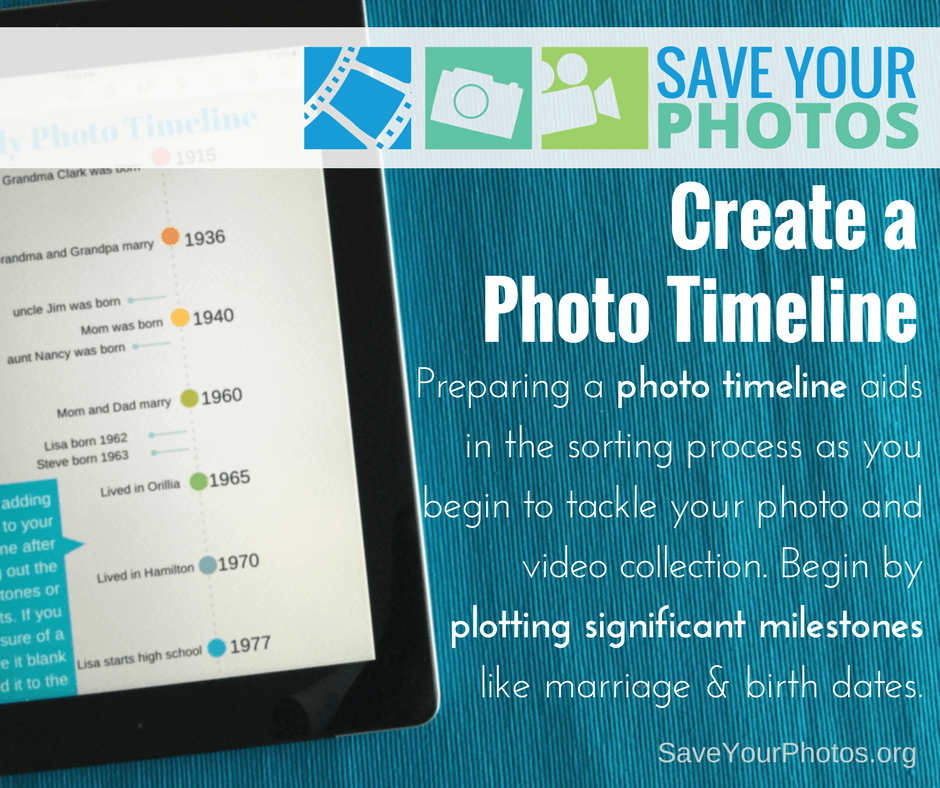
Create a Family Timeline | SaveYourPhotos.org

Most of our lives can be mapped into important milestones on a timeline, even though we may not know specific dates.  Once a timeline is created, you will use this as a roadmap for indexing your photos during the sorting process.  Trust us; you’ll be glad you took the time to complete this step.

Create a family timeline to act as a road map for your #photo #organizing project #saveyourphotos Click To Tweet

Map Your Family Timeline

As you look at the entire collection of photos/videos that you are working with, determine the oldest photo and the most recent photo. This is the time span that you will plot on your map.

Once you have these major markers in place, you can begin to jot other moments or milestones in between until you are satisfied with your timeline. Plot your timeline on a spreadsheet or in a notebook, for easy reference. You will refer to this often as you start sorting, and details may change based on some of your photo discoveries.

Now is a good time to ask your relatives about key dates and events for accuracy, especially if you are working with heritage photos!
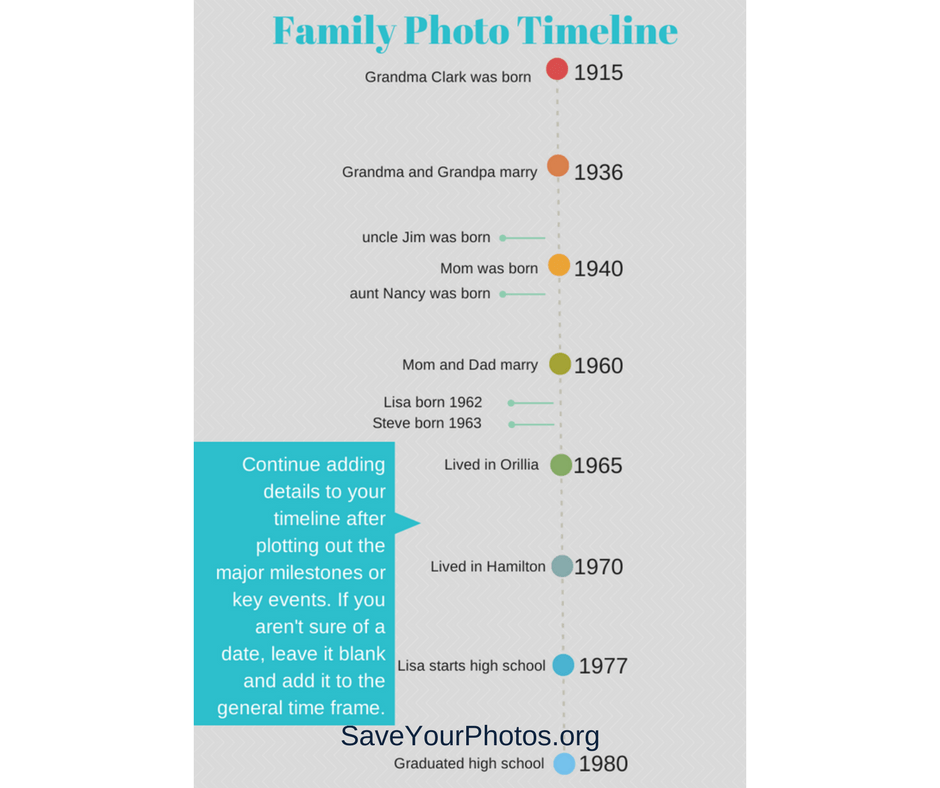
Create a Family Timeline | SaveYourPhotos.org

Events/Dates to Add to Your Family Timeline

Here are a few event and date ideas to get your family timeline started.

  • Birth
  • Marriage/Divorce
  • Death
  • Adoption
  • Immigration/Naturalization
  • Move to new home/city
  • Graduations
  • Baptism/Christening
  • Military Service
  • Retirement

Are you ready to start your timeline?


Sign up today for more great photo organizing tips directly in your email box.

We also invite you to visit our sister blog The Photo Organizers for more tips and in-depth knowledge from some of the top photo organizing industry professionals. To find a photo organizer near you, visit the Association of Personal Photo Organizers.


Written by Andi Willis · Categorized: Photo Organization · Tagged: family timeline, how to organise photos, how to organize photos, photo organising, photo organizing, photo timeline

Aug 04 2017

Don’t Let Great Memories Fade Away

Don’t Let Great Memories Fade Away

Rick Voight of Vivid-Pix™ reminds us to not let our memories fade away.  Vivid-Pix™ is a proud sponsor of 2017 Save Your Photos Month.

Don't Let Your Memories Fade Away | SaveYourPhotos.org

Our memories make us who we are.

Our memories are the stories of us. They’re the bridge to our past that links us to our grandparents, parents, siblings, children, grandchildren, and friends. Like treasured heirlooms, our memories teach us that the bonds of family and friendship need to be cherished above all else. Sharing those memories enriches our life by bringing us closer to our loved ones.

Memories cannot be replaced, but they can be revived.

Those photographs lying in a shoebox are memories waiting to be revived, relived, and shared. That old photo album collecting dust might have an irreplaceable picture of your daughter playing with her dolls; or that memorable picture of you and your college roommates the day you all moved in. These amazing memories deserve a second chance.

Breathe new life into old memories by reviving & restoring your #photos to their original splendor. @VividPixFix Click To Tweet

Restore, revive, keep and share your precious memories easily.

Breathe new life into old memories by reviving and restoring your photos to their original splendor. With a wide range of services and programs available, the process of restoring old photos is not as challenging as you think. Just take it one step at a time.

Don't Let Your Memories Fade | SaveYourPhotos.org

Gather

Gather all your photos from those boxes and photo albums. Don’t forget any photos stored digitally on old computers or laptops. Start by gently removing any dust or dirt from your photos with a soft cloth.

Don't Let Your Memories Fade | SaveYourPhotos.org

Organize

Think about how you want to organize your photos. You can group them by date or event, family members or vacations. There are lots of ways to organize your collection. Choose a system that works for you and create stacks of your photos accordingly. If this sounds like too much, check out APPO.org, where you can search for a professional to help you organize your entire photo collection.

Scan

Now it’s time to digitize your photos by scanning them. You can scan several photos at once on your printer’s scanner. Or use an app such as Shoebox from Ancestry.com on your phone. (If you’re using your phone to scan, remember to scan photos in a room with lots of natural light.) You can also just delegate this process to a local store or a scanning service like Scanmyphotos.com, which scans, crops, edits and archives your photos.

Don't Let Your Memories Fade | SaveYourPhotos.org

Restore

After your photos are scanned, the next step is to restore their vibrancy. With innovative photo correction software like Vivid-Pix™ RESTORE Picture-Fix, enhancing and refining your old photos is as easy as 1, 2, 3. You can restore color and clarity with just one click. And what’s more, RESTORE also improves on the built-in enhancement software in scanners and scanning services.


So relive and celebrate those unforgettable moments once again by converting your slide and print photos to digital images. Revive their vivid color and clarity and store them securely, so you can share them with family and friends–and continue to enjoy them for years to come. Just as memories stand the test of time, now your treasured pictures will, too.


Sign up today for more great photo organizing tips directly in your email box.

We also invite you to visit our sister blog The Photo Organizers for more tips and in-depth knowledge from some of the top photo organizing industry professionals. To find a photo organizer near you, visit the Association of Personal Photo Organizers.


Rick Voight of Vivid-PixRick Voight is a lifelong snapshooter, who has been in the imaging business for a few decades. “Rick, Randy, and a few excellent people” created Vivid-Pix™ to make it easy for customers to get and share better photos. Vivid-Pix patented and proprietary software’s follow the slogan created a century ago – “you press the button, we do the rest”.

At HP, Rick helped create the Retail Publishing Solutions division – connecting home, store and online – delivering photos and gifts in minutes, in an hour, and in a few days. At Kodak, he enjoyed working with just about every class-of-trade, developed relations and promotions with local, regional, national, and international sporting teams, theme parks, and organizations; creating new technologies and revenues.

Rick is a volunteer and board member working with multiple non-profit organizations.

Vivid-Pix | Save Your Photos Month 2017 Sponsor


Don't Let Your Memories Fade | SaveYourPhotos.org

Written by Andi Willis · Categorized: Photo Organization · Tagged: how to organise photos, how to organize photos, photo organising, photo organizing, photo restoration, save your photos, Vivid-Pix

Aug 02 2017

Save Your Photos: Take A Photo Inventory

Save Your Photos: Take A Photo Inventory

How many photos do you have in your digital collection? What about your print collection? What about film, video and other memorabilia? It’s time to take a photo inventory.

Save Your Photos: Take a Photo Inventory | SaveYourPhotos.org

Assess the mess. It’s time to take an photo inventory!  You need to know how many photos you have so you can plan the scope of your project and the time involved.

Digital Photo Inventory

Taking a count of your digital photos can be done in a few clicks. Be sure to look for various formats for digital photos such as JPEG, TIFF, PNG, GIF, and Raw.

Organizing your pictures? Take a #photo inventory so you know what you are dealing with. #saveyourphotos Click To Tweet

Print Photo Inventory

Printed photos are a little less exact.

Professional photo organizers measure photos or weigh them when estimating. A one-inch stack of photos is approximately 100 pictures. This number may be less if you are working with older photos which may have a thicker backing. If you weigh boxes of photos, 6-7 pounds is the equivalent of 1000-1200 photos.

Don’t forget your slides. A circular slide carousel holds either 80 or 140 slides. If you are unsure about the slides you have, you can check out this rare slide guide.

Home Movie Inventory

When counting your home movie collection, you will find it helpful to count the various film and video formats. Not sure how to determine the formats? These two links will take you to The National Archives for information on how to identify them.

Film Formats

Video Formats

And don’t forget to count your memorabilia!

Save Your Photos: Take a Photo Inventory | SaveYourPhotos.org

What are your final numbers?


Sign up today for more great photo organizing tips directly in your email box.

We also invite you to visit our sister blog The Photo Organizers for more tips and in-depth knowledge from some of the top photo organizing industry professionals. To find a photo organizer near you, visit the Association of Personal Photo Organizers.
Written by Andi Willis · Categorized: Photo Organization · Tagged: counting photos, photo inventory, photo organising, photo organizing

Jul 26 2017

Save Your Photos: Set A Goal

Save Your Photos: Set A Goal

The first step to getting your photo life organized is picturing the end result. In other words, set a goal for yourself and your photos, videos and memorabilia. Just like any goal, you need to have a concrete vision with a timeline for completion.

Save Your Photos: Set A Goal | SaveYourPhotos.org

Having an end-goal and a deadline will help motivate you towards completion. Think ahead to when you have your entire photo and video collection organized and accessible.

  • How would you like to share and enjoy these pictures?
  • Do you want a family yearbook with highlights?
  • Do you want a photo gallery on your wall with milestone events?
  • Do you want online photo albums that other members of your family can access?
  • What about a video slideshow to enjoy with some popcorn?

Choose a few fun ways you plan to celebrate and share your photos – this is the fun part!

Next, think about who you plan to share your photos with and let them in on your plans.

Create a goal and timeline for your #photo #organizing project. #saveyourphotos Click To Tweet

You are more likely to achieve your goal when you tell someone who can hold you accountable.

You can do it! Once you’ve set your goal, let us know what it is. Maybe you can inspire someone else’s goal.

Save Your Photos: Set A Goal | SaveYourPhotos.org


Sign up today for more great photo organizing tips directly in your email box.

We also invite you to visit our sister blog The Photo Organizers for more tips and in-depth knowledge from some of the top photo organizing industry professionals. To find a photo organizer near you, visit the Association of Personal Photo Organizers.



Written by Andi Willis · Categorized: Photo Organization · Tagged: digital photos, how to organize photos, organise photos, organizing photos, photo organizing, photo preservation, photo solutions, print photos, save photos, schedule, set a goal, timeline

Jul 19 2017

Save Your Photos: Get Set Up for Success

Save Your Photos: Get Set Up for Success

Any good organizing project starts with a good workspace and a plan. This week we are discussing how to find a great workspace to ensure your photo organizing project is set up for success.

Save Your Photos: Set Up for Success | SaveYourPhotos.org

Set Up for Success: Find a Work Space

Let’s get down to business. Remember the saying “out of sight, out of mind”? Depending on the size of you photo collection, you may be working on this for a while. (And you probably have a lot of photos because, remember we are all overwhelmed!) If everything is tucked away or hidden in closets and on computers, it will be easy to forget. You’ve made a commitment to organize your photos, so let’s get them into an area where you can work on them.

Set yourself up for #photo #organizing success with a great workspace. Click To Tweet

Designate a temporary workspace in your home that is visible and allows you to spread out. A large table in the corner of a room or a separate room is ideal and causes the least amount of disruption. When you’re project is visible, you’re more likely to remain focused on completion.  If you set yourself up on your dining room table, then you may have to pack it up again when you want to sit the family for dinner! If space is an issue, take a photo of the locations where your photos are stored so you can create a vision board of what you are dealing with.

Save Your Photos: Set Up for Success | SaveYourPhotos.org

Set Up For Success: Hunt and Gather

Next, gather your memory collection into your workspace. Locate all photo albums, loose printed photos, memorabilia, kids artwork, negatives, slides, undeveloped film, memory cards, family artifacts, home movies (ex. VCR tapes, miniDV’s, film, etc.). Determine the devices where you have photos stored, such as your smartphone, computers, and tablets. Resist the temptation to start sorting yet or reminiscing! There will be time for that later.

Ready, set, GO!


Sign up today for more great photo organizing tips directly in your email box.

We also invite you to visit our sister blog The Photo Organizers for more tips and in-depth knowledge from some of the top photo organizing industry professionals. To find a photo organizer near you, visit the Association of Personal Photo Organizers.

Written by Andi Willis · Categorized: Photo Organization · Tagged: digital photos, organising photos, organizing photos, photo organizing, photo preservation, photo solutions, print photos, save photos, save your photos, workspace

  • « Previous Page
  • 1
  • …
  • 5
  • 6
  • 7
  • 8
  • Next Page »

© Copyright 2017 Association of Personal Photo Organizers · All Rights Reserved · Privacy Policy