Save Your Photos

  • Home
  • Blog
  • Disaster Help
    • Disaster Resources
    • Hurricane Harvey Photo Recovery
    • Hurricane Irma Photo Recovery
  • Who We Are
    • Save Your Photos Group
    • The Photo Organizers Blog
    • Association of Personal Photo Organizers
  • Sponsors
    • How To Become A Corporate Sponsor

Sep 23 2016

Why Print Your Photos?

Why Print Your Photos?

This is a Guest Contribution by Chari Pack, Founder of PersnicketyPrints, who believes you should print you photos.

Why Print Your Photos? | SaveYourPhotos.org

We are taking more photos than ever before, but what about preserving them? What happens when today’s high-tech data storage systems become tomorrow’s floppy discs?

In today's digital world, do you print your #photos? #saveyourphotos Click To Tweet

Entering A Digital Dark Age

Vint Cerf, Google VP and Father of the Internet, warned us last year of a “digital dark age”.

Why Print Your Photos? | SaveYourPhotos.org
“If we don’t find a solution our 21st Century will be an information black hole. We think about digitizing things because we think we will preserve them, but what we don’t understand is that unless we take other steps, those digital versions may not be any better, and may even be worse, than the artifacts that we digitized.”
Image Credit : http://www.theguardian.com/technology/2015/feb/13/google-boss-warns-forgotten-century-email-photos-vint-cerf


Why Print Your Photos? | SaveYourPhotos.org
“We have various formats for digital photographs and movies and those formats need software to correctly render those objects. Sometimes the standards we use to produce those objects fade away and are replaced by other alternatives and then software that is supposed to render images can’t render older formats, so the images are no longer visible.” – Vint Cerf


The Library of Congress expresses the same concern with Digital Preservation when it comes to digital memories and provides the following Archiving Tips:

  1. Identify where you have digital photos
  2. Decide which photos are most important
  3. Organize the selected photos
  4. Make copies and store them in different places

Not only should we be printing our most treasured moments, we should also be aware of preservation. Will that inkjet printer you have next to the laundry room process images that will actually last?

Print Your Photos To Preserve Them

We live in a time of instant gratification. We want it now. At Persnickety Prints, we understand this; however, when it comes to printing, archival longevity is just as important. All Persnickety orders are processed in-house and shipped within 12 hours. Lab techs look at every single image as it’s printed and again once it’s completed. At Persnickety Prints, we still use a dark room. No ink. Silver Halide printing is still the most archival, fade and water resistant printing medium available.

Why Print Your Photos? | SaveYourPhotos.org

 How do YOU print your photos? Or do you?


Sign up today for more great photo organizing tips directly in your email box.

We also invite you to visit our sister blog The Photo Organizers for more tips and in-depth knowledge from some of the top photo organizing industry professionals. To find a photo organizer near you, visit the Association of Personal Photo Organizers.


Why Print Your Photos? | SaveYourPhotos.org


chari

Founder | CEO | Photographer | Designer | Product Development | iPhoneographer | Social Media Expert | Public Speaker

  • After a long search for high quality affordable printing, Chari saw a need and created her own; Persnickety Prints.
  • Completely bootstrapped, Chari went from zero to hero and continues to grow each year without funding or investors. She is passionate about the customer, striving to educate and serve each one in this new digital age.
  • Before founding Persnickety Prints, Chari helped numerous organizations increase their online presence and revenue through her creative services. Chari graduated top of her class & received a Business Management degree from UVU.  Her hands on retail knowledge and expertise comes from over 10 years of service at the retail industry giant, GAP.
  • When Chari is not working on the next innovative business idea, she is calling a customer about their low resolution image, driving one of her 3 boys to a soccer game, or racing her mountain bike.

Chari is Persnickety in all things.

Written by Jackie Lyals · Categorized: Printing · Tagged: how to print photos, paper photos, photo printing, print photos, printed photos, save photos

Aug 25 2016

Timeline of Our Family

Timeline of Our Family

This is a guest contribution by Rhoda Gordon of Sunflower Photo Solutions.

Gordon Post

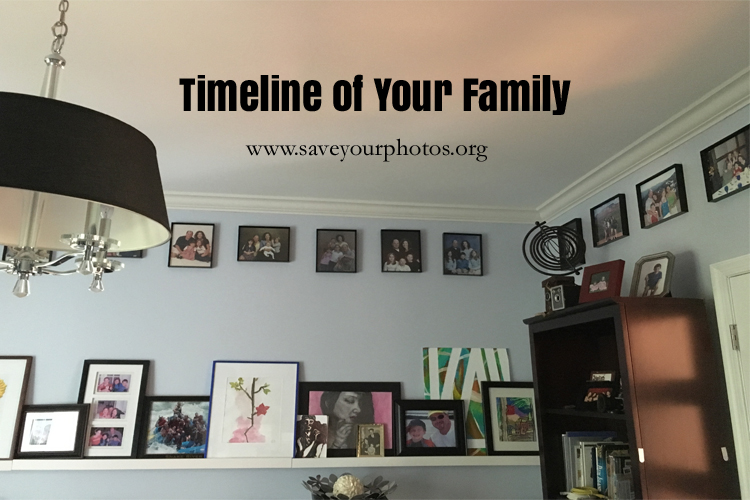
Are you searching for one more excuse to print out your photos? This is it! I have a great idea that my sweet husband gets all the credit for. When we got married, he suggested we take a family picture each year to hang in our home. This is what we have done for the last 26 years which have become a timeline of our family.

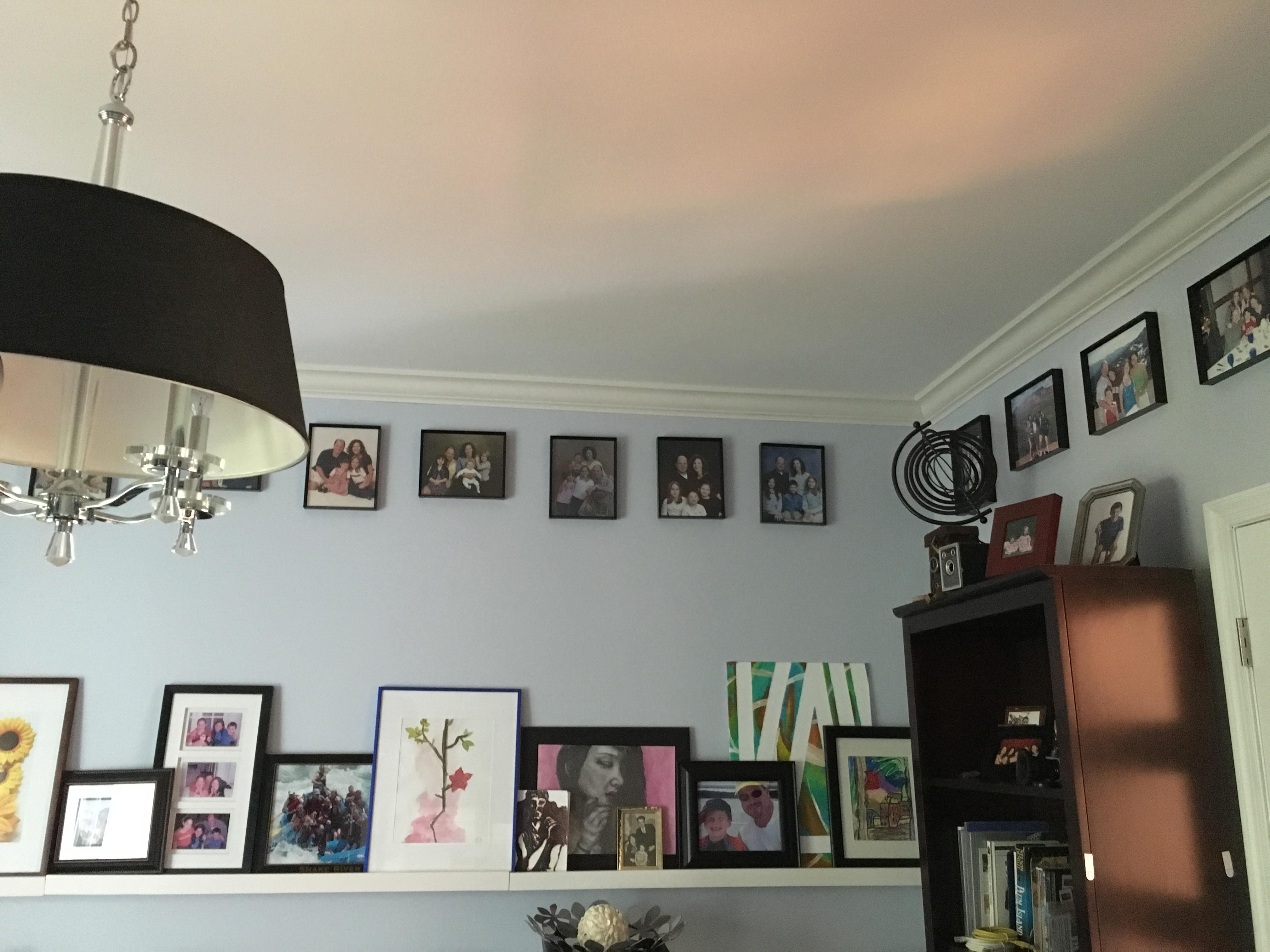
These pictures hang in our study about 6 inches below the ceiling and span all four walls. They march in progression from the first, which is our wedding photo, to the last, which was taken only a few weeks ago.  We chose the study because, at the time, this was a room that would be used by all family members. Remember the days of one large, desktop computer?  Well, our study still gets a lot of use.

Gordon #1
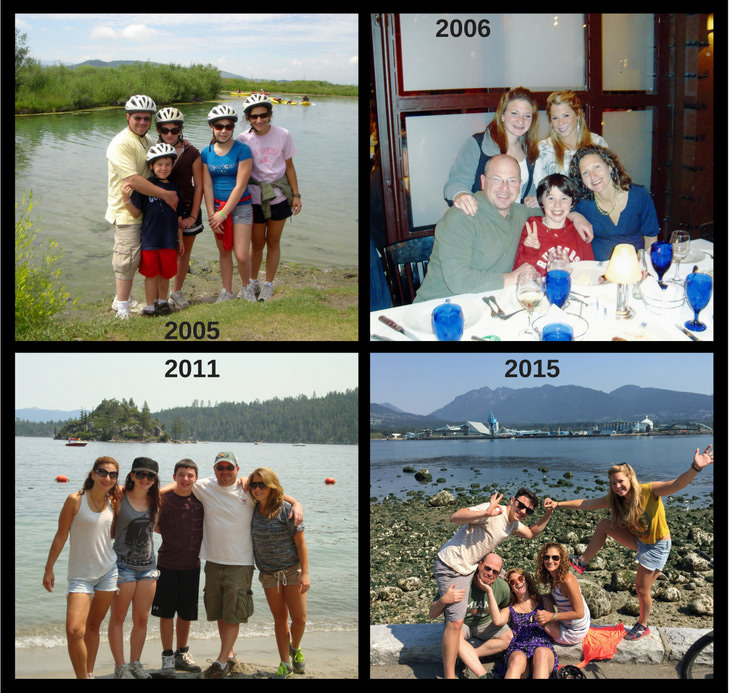
These pictures not only tell the story of our family, but they also are an insight into how capturing images has changed over the years.  The first ten years or so we had professional photos shot, then we began to shoot our own because taking quality photos became easier. Hmm, it was either because the digital cameras were introduced, or the fact that we no longer had squirming children. The only thing consistent about the images is the people in them, but I defined a collection by giving them the same look and feel with simple black framing and a consistent size.

Years_GordonFamily copy
It is a wonderful feeling to look back and see how our family has grown, to see the progression of the kids and how my husband and I have aged.  Some of the images are posed but as we all have gotten older, more of them are casual and some downright silly. This reflects the personality of our family and how we live our life. This is the timeline of The Gordon Family and I am so happy my husband thought of it!


Rhoda
Rhoda Gordon

Rhoda Gordon is the founder of Sunflower Photo Solutions, a photo organizing, scanning, and preservation firm. Photography is in her blood. She comes from a long line of photo and photo equipment enthusiasts going back several generations. She has been organizing photos, creating slideshows and photo books most of her adult life. Now she helps others do the same. Her services include print and digital photo organization, image and document digitization, slideshow and photo book creation, photo restoration, and personal training in all of the aforementioned.

Her career began as an electrical engineer working for AT&T Bell Labs, Lucent Technologies, and more recently, Rhoda has been teaching at Brookdale Community College. She is a certified personal photo organizer and a member of APPO (Association of Personal Photo Organizers). Rhoda is dedicated to her craft and continually takes ongoing education to keep up with the latest technology. She was raised in Monmouth County, graduated from Rutger’s University and currently lives in Freehold, NJ.

Rhoda is a wife and mom of 3 beautiful children; one daughter in graduate school, another one in college, and a son in high school. She loves spending time with them, her wonderful husband and their basset hound, Rambo. She also has found the time to be a committed volunteer for CentraState Medical Center and its foundation since 1995.

Rhoda’s passion is helping others preserve their beautiful memories in a way that they can revisit them again and again. She believes that pictures tell the story of our lives, and that of our families.

Let her help you tell and preserve your story.


Written by Jackie Lyals · Categorized: Creating Memories, Displaying Photos, Photo Storage, Printing

Jul 21 2016

Enjoy Your Photos Now

Enjoy Your Photos Now

This is a guest contribution by Cheryl DiFrank of My Memory File

DiFrank Post

Over the 21 years that I have known my husband, he has given me several pieces of very nice jewelry. Some of them were expensive so I diligently hide them in my underwear drawer to keep them safe, and to eventually hand down to my children, because the pieces are so special and meaningful. But I hardly ever wear them. Some of them my children have never even seen. Unfortunately, I have never gotten in the habit of wearing diamonds to a PTA meeting or when I’m working from my home office. So I just keep them safe, knowing that they will make someone very happy one day.

The question is: Why do I hide such special things away when I could be enjoying them now, sharing their stories with my kids now? Wouldn’t they be more meaningful to my husband, myself and my children if they could see me wearing them now and knew the stories of when I received them?

Does the same thing happen to your photos? We take thousands of photos every year to preserve all these wonderful memories and stories. Hopefully we organize and backup all the photos to keep them safe for our children and grandchildren. But when was the last time you actually went back and looked at the photos you took from the last birthday party, or that fantastic vacation? Did you share the photos with your kids so you could all relive it together? Or, like the jewelry, do you just make sure the photos are safe and you’ll get around to looking at them later, and handing down a photo collection of yours and your children’s lives, many of which they have never even seen?

Often the only reason we even download the photos is to regain storage space on our phone or camera memory card, a message that we inevitably get just minutes before the recital or the birthday party. So then we hurriedly download months of photos while the rest of the family is waiting in the car, heading for the next photo-worthy event. Going back and leisurely looking at the photos ends up on the to-do list right between “organize sock drawer” and “teach the dog to use the toilet.” We think: The photos will be there. I can look at them when I retire. Hopefully I’ll remember who everyone is.

Wouldn’t it be nice to enjoy the photos now? My kids love looking at photos of themselves when they were young. They love reliving old vacations and birthdays. And let’s face it, I like seeing photos of myself before the gray hairs appeared. So is there an easy way to view and enjoy your photos now? Yes! There are several! A couple that you can even do while you’re reading this. Here are a few ideas to get you started.

Enjoy Your Photos

One caveat…. To really enjoy your photos (and not end up seeing 15 variations of the same shot, or all those pictures your daughter took of her brother’s tongue), the first step needs to be a certain amount of editing. If you are an average digital photographer, you cannot help but click the shutter at least three times every time you take a photo, just to make sure you got the shot, and just in case the first (or second, or third) one was out of focus. You need to edit down to the best shot of each sequence, take out the tongue photos and any other photos that are out of focus or just not worth keeping. Once you’ve gotten down to the selection of the best photos, consider your options to enjoy and share them.

Traditional Picture Frames

Traditional picture frames may seem very old-fashioned in our high-tech world. But I smile every time I walk by the photos sitting on the piano or hanging on the wall. I also like to change the photos in the frames periodically. My family notices when a photo in a frame has been changed, and they always comment on the event in the photo. Find inexpensive frames at stores like Marshalls, TJ Maxx or Home Goods and then it’s easy to print out a few photos from a fun event or from the previous year and swap out the photos in the frames.

A Computer Slideshow

There are several software and online options for making easy (or more complex) slideshows. In addition, both Mac and PC computers have resident software that allows you to make a simple slideshow in seconds. In iPhoto or Photos on a Mac, simply create an album and put all the photos you want to view into the album. Hit the play button to view your slideshow full screen. If you don’t use iPhoto or Photos, but have all your edited photos in a single folder or directory, just highlight/select all the photos you want to view in your slideshow and double-click one of them, or select File->Open to open them all in Preview, the Mac photo viewing software. Once the photos are open in Preview, select View->Slideshow to view a full-screen slideshow of the photos.

On a PC, open the folder of photos you want to view and double click on the first photo in the folder.  It should open up in the resident photo viewing software on your computer (probably “Windows Viewer” or “Windows Live”).  At the bottom of the screen you can use the right or left arrows to move through the photos or you can click on the small slide show icon in the bottom left, or click on the “slide show” button at the top of the screen.  Both will start a full-screen slideshow.  Roll your mouse down at the bottom of the screen to get a play or pause button to start or stop the show.  To exit the slideshow, hit the “esc” key on your keyboard.

Digital Frame

The only downside to a slideshow on your computer is that for more than one person to view it, you need to crowd around your computer screen. A portable laptop can solve this problem but you might also consider a digital picture frame that displays a continual slideshow. There are lots of different digital frames but most can hold a memory card with over a thousand photos. There are also several wi-fi frames, where you can easily email photos from your phone to the frame without having to plug-in a memory card or camera. Place the frame where everyone can enjoy it as they walk by.

Photo book

If you have a little more time and want something that’s more tangible and permanent, a photo book is a great option. Photo books are created digitally, usually online, and then printed and sent to you. They are the current (and much improved) version of the old magnetic photo albums with the plastic overlay pages. There are seemingly endless websites to make photo books, many offering a wide variety of layouts and designs. One of my favorites is Shutterfly, which offers a number of layouts and tools that make it easy to put together a beautiful book.

Whenever you make any kind of photo album (digital photo book, or more traditional photo album) consider burning a DVD of all the photos in the book and placing the DVD in an adhesive pouch in the back of the book. (You can find plastic adhesive DVD envelopes at Staples or Amazon.) So when you or someone else are looking through the album and you find the perfect photo for Throwback Thursday, or need to collect photos for a wedding or anniversary party, you can easily find the photos on the DVD. The DVD also serves as an additional backup of the photos on your hard drive. *But always make sure to backup your photos in at least 2 places.

Warning: Please do not use Shutterfly or any other book making site as your “online/cloud” backup. It may seem like killing two birds with one stone – upload the photos to make the book and now they’re backed up on that site as well. However, most of the book printing sites do not make it easy to get your photos back if you need to. And isn’t that the point of a back up – the ability to get your photos back if your computer crashes or some other catastrophe wipes out all your photos. Do not depend on being able to get all your photos back easily from a book printing or even photo sharing site.

Photo Gifts

You’ve probably received (and most likely made) a photo holiday card. And maybe you’ve seen or purchased photo mugs and mousepads. But did you know that you can make personalized photo placemats, aprons, playing cards, blankets, shower curtains, coasters, puzzles, neckties, and much more. You can even customize a Rubik’s Cube with your photos on each side, instead of solid colors! What unique conversation pieces and fun ways to enjoy your photos every day.

Don’t forget why we take photos in the first place – to actually view and enjoy them. So enjoy them now. Make it a January tradition, or a holiday tradition, or any time, to review the photos from the last year and share them with your family. The photos will mean even more to you and your family when actually enjoying the photos becomes part of the story you are handing down.


DiFrank_portrait
      Cheryl DiFrank

Cheryl is the owner of My Memory File (mymemoryfile.com).  Growing up with her professional photographer father, Cheryl has always known the power photos have to tell a story, to teach, to inspire and to connect people.  For many years she owned a professional photo agency, managing the collections of over 400 professional photographers.  When she started her own family it became even more clear how important it was to preserve her family’s story and be able to share it with her own children.  Cheryl started helping individuals organize their own photo collections in order to preserve and share their own stories.  She is passionate about making sure that her clients’ irreplaceable photos are organized in a way that keeps them safe and allows them to be viewed and shared, not just kept in a box or hidden on a hard drive. Whether it’s scanning the boxes of old prints in the attic, or organizing all the digital photos that are spread over computers, cameras, memory cards and phones, Cheryl can help get them all organized and in a format that is easy to access and enjoy.

Written by Jackie Lyals · Categorized: Backup, Creating Memories, Photo Organization, Printing, Safeguard

Jun 21 2016

It’s Time to Tidy Up Your Photos!

It’s Time to Tidy Up Your Photos!

This is a guest contribution from Cathi Nelson, Founder of The Association of Personal Photo Organizers

Cathi_Nelson Blog Post

Most of us don’t want to save the thousands and thousands of photos we take each month. What we really want to save are the ones that matter. Could you quickly find the photos that bring you joy and happiness? Probably not; it simply isn’t possible when you likely took a few hundred in just the past week!

However, think about it. What photos would you choose? The fun family photos of everyone together at the beach on a warm summer night? A photo of your parents when they were young and healthy? Your son’s first birthday party or your daughter walking down the aisle? The list isn’t mysterious because as human beings, we cherish the times we spend with family and friends. We document those moments with our phones and cameras to capture a moment in time that reminds us of all we hold dear.

So what is the problem? With the popularity and affordability of digital cameras and mobile phones, many of us are sitting on a virtual heap of digital images. Combine that with all of those hard copy photos we always meant to stick in an album and suddenly we’re in over our heads.

This is exactly why we have designated September as Save Your Photos Month—it’s time to Tidy Up Your Photos and we are here to help lead the way!

Your first step is to take the pledge to Save Your Photos. It’s your promise to yourself that you will take action during the month of September—and you won’t be alone. You will be joining thousands of others throughout the world who have taken the pledge. Beginning on September 1st, we will send you a daily email with a tip to inspire you and to keep you on schedule. If you can spare even just a few minutes a day, you can join the fun, start to organize, and participate in tidying up your photo collection.

Imagine the sense of relief you will experience when you can easily find the photos that bring you joy.

The Save Your Photos initiative is a public service outreach campaign developed by The Association of Personal Photo Organizers (APPO) to teach individuals how they can preserve life’s irreplaceable photos, videos and documents in case of unforeseen accident or disaster.


Cathi Nelson profile
Cathi Nelson

Cathi Nelson founded (APPO) as an answer to the growing need of our digital age – assistance for organizing an influx of digital photo memories, printed photos, media and memorabilia. APPO supports its hundreds of members by offering ongoing training, a supportive community, professional credibility and an annual educational national conference.

Written by Jackie Lyals · Categorized: Backup, Creating Memories, Photo Organization, Printing

Jun 14 2016

Scanning Solutions for 12×12 Scrapbook Albums

Scanning Solutions for 12×12 Scrapbook Albums

This is a guest contribution from Dorothy Huey of Photo Solutions with Dorothy Huey

12x12 Album

12×12 Scrapbook Album Scanning Solution

My cousin, and frequent attendee at my Creative Memories crops over the years, showed me a heritage album she had made that I had completely forgotten about.  Of course, I wanted a copy so I asked if I could scan it.  She was happy to share it with me!  I was using my Flip Pal mobile scanner (The Flip-Pal mobile scanner is the world’s original scanner for digitally capturing photos, cherished memorabilia, and documents that is battery powered and does not require a computer to operate. The patented flip-and-scan technology allows scanning photos in place without removing them from an album or frame. The included EasyStitch software quickly and automatically reassembles multiple scans into their larger original.), but with a 12×12 album, that’s a lot of scans and a lot of stitching.

A fellow APPO member recommended going to a local college or university to see if they might have a larger scanner available for use….

I graduated from Montclair State University in Montclair, New Jersey, but it didn’t matter as far as gaining access to the scanner (you don’t have to be a student or current alumni but check with your local entity to see if that applies at their location).  I decided to call first to see if this is a viable option and to check availability.  On the phone, I was told it was free to use the scanner and that this particular scanner could accommodate the 12×12 size.  The librarian measured it for me just to be certain.  I was told it was a book scanner and that it could probably only do 200 or 300 dpi, but I decided to try it anyway.

When I went to the campus library,  I was pleased to see that there were several scanning options on the scanner, one of which was photos. And high quality, too!  I wasn’t able to find out the dpi so I just scanned the pages. The librarian was helpful but not knowledgeable about the equipment (perhaps find out in advance the type of printer and do a little research prior to scanning so you’ll have a general working knowledge if they don’t!).

Upon finishing the scanning, I was prompted to save the scans. I had a flash drive (make sure you have one with memory large enough to store your files!), I plugged it in and saved to the drive.

At home I was quite happy to see that they were scanned at 600 dpi!  My cousin and I are both happy – I’m giving her a copy of the scans as a backup to her beautiful album and I can get a printed copy for myself AND keep a backup!

It’s a great solution for personal 12×12 album scanning, for backup and sharing!


11198730_10152964780437561_2024910275_n
Dorothy Huey

Photo Solutions with Dorothy Huey has grown out of my 20 years as a Creative Memories Consultant. My focus now – as a Personal Photo Organizer and a member of APPO (Association of Personal Photo Organizers) is Service – my goal is to help you manage your photos – now and for years to come.

You can find Dorothy at www.appo.org/member/hueynews.


Written by Jackie Lyals · Categorized: Creating Memories, Printing, Safeguard

© Copyright 2017 Association of Personal Photo Organizers · All Rights Reserved · Privacy Policy