Save Your Photos

  • Home
  • Blog
  • Disaster Help
    • Disaster Resources
    • Hurricane Harvey Photo Recovery
    • Hurricane Irma Photo Recovery
  • Who We Are
    • Save Your Photos Group
    • The Photo Organizers Blog
    • Association of Personal Photo Organizers
  • Sponsors
    • How To Become A Corporate Sponsor

Sep 29 2017

Bridging Generations: Telling the Stories & Saving The Photos

Bridging Generations: Telling the Stories & Saving The Photos

This blog post is sponsored by Forever, the only full-resolution online storage guaranteed for your lifetime plus 100 years. Forever is also a Save Your Photos month sponsor.

Bridging Generations: Telling The Stories & Saving The Photos | SaveYourPhotos.org

Who is your family historian? Who takes the photos? Who keeps the photos? Ever since I was in grade school, I have loved to hear people tell their stories. Raised on a family farm by strict parents in the 1950s, we four children were “seen and not heard.” I have fond memories, however, of the rare times my parents would tell a story about their past. We would sit spellbound around the kitchen table while our parents reminisced, sometimes in German. The first photo taken of me was by a guest at my 3rd birthday party. I inherited this special photo but no story. I was smitten with a lifelong passion – help others tell their stories and bridge generations before it’s too late.

Bridging Generations: Telling The Stories & Saving The Photos | SaveYourPhotos.org
Cameras were a luxury item for my parents in the 1940s — so a guest captured this photo of me at my 3rd birthday party on January 20, 1948 in Belfry, Montana. This was the FIRST photo taken of me that I now treasure as one of my 100 most important photos. Photo courtesy of Lynnette Feusner.

We All Have A Story

I recall in college returning one of my mom’s 8×10 pictures back to her and asking her to write the story behind the photo. She was indignant and replied, “I don’t have a story!” Perhaps the Great Depression (1929-1939) blanketed her memories. On the other hand, I also remember gifting each of my husband’s parents a photo album, mounting corners, and a black pigma pen and asking them to add a few photos and write about them. His aging father spent several days adding some of his favorite photos and, in his shaky hand, identifying some of the people. We treasure and hold dear these 10 pages of written family history. Moving forward into the next generation, our youngest daughter has created numerous family photo books for her son, our only grandchild, during his school years. What do your children know about their grandparents, uncles, and aunts? Photos are our autobiography. They prove we have lived, loved, laughed, and celebrated who we are – our Legacy.

A Tale Of A Story Lost

With the focus in September on Saving Your Photos, we all know of someone who has lost family photos. Recently a prominent Alaskan shared his heart-wrenching story with me. He wrote, “Our family had been quite good about capturing snapshots of our family life, vacations, milestones, etc. — our photo albums had great value. In the later years of my Mom’s life, whenever the family gathered we almost always got out a couple of the photo books to relive and reminisce about our family life. When my mother died a few years ago at age 83, my three siblings and I gathered back at the farmhouse where we grew up for her funeral service and celebration of life.

After my brother and sisters selected our favorite heirloom furniture, etc., we gathered all the photo albums in one place. These included not only our family photos, but also my parents’, and some of my grandparents’ photos (many of them the 2.25-inch square Brownie photos from the 1920s and 1930s). My task was to gather up these priceless albums. When I arrived to pick up the albums, I was shocked to discover that I was too late. My brother had told the company hired to clear out the remainder of the house that whatever was left over was trash and should be taken to the dump. The company had already hauled everything off. I was absolutely, totally devastated to learn that our priceless, irreplaceable family photos were gone forever, with no way to recover them.

This is a reminder of the high stakes and big risks that people take when they either decide not to preserve their photo memories with backup scans or delay the task until it is too late.”

Bridging Generations: Telling The Stories & Saving The Photos | SaveYourPhotos.org
A page out of Wayne Feusner’s album. His handwriting is an important piece of his story. Photo courtesy of Lynnette Feusner

His loss continues to fuel my passion for preserving my own story and family history that I am working on.

After I lost my parents, I inherited a large plastic tub and weathered suitcase of their old photos and outdated media with no written documentation. Over the past 50 years, I have spent countless hours researching old photos, gathering historical documents, and interviewing distant relatives to piece together my history. But what would happen if my work were inadvertently thrown out?

Fortunately, I was introduced to a company whose mission was the same as mine. I finally found the missing piece of the puzzle – Forever, the world’s first permanent photo storage and sharing website. It’s my complete memory-keeping platform. I converted old media and am currently uploading, editing, documenting, and saving my work in my curated Forever library. Forever is my safe, secure, guaranteed storytelling home. For me, Forever was a smart investment because once I purchased my storage account, I experienced peace of mind knowing that I OWNED it and that most of my money was safekeeping my memories forever — it’s like my generational life insurance.

Bridging Generations: Telling The Stories & Saving The Photos | SaveYourPhotos.org
This is another page out of Wayne Feusner’s album. Photo courtesy of Lynnette Feusner

Stories (and Photos) Lost in The Digital Forest

Now that technology has replaced the proverbial shoebox, we are drowning in a sea of digital chaos. Not everyone will feel the immediacy of doing something with their printed and digital photos. Is it because they’re “out of sight, out of mind?” I have found that most people think about their photos only when faced with a tragedy or a deadline such as a milestone graduation, a celebration poster to display at a funeral, or an impending hurricane or tornado. What are YOU waiting for?

If you are ready to begin telling and preserving your own family story, here are some action steps that I recommend to help you keep your family history alive and go from Overwhelmed to Overjoyed!

  • Make a date to work on sorting and curating your printed and digital photos – preferably 15 minutes a day or an hour a week or at least once a month. Put this photo time on your calendar in your phone for an important reminder.
  • Enlist the support of a family member or friend for an accountability partner. After all, you are doing the important work of rescuing lost family memories, and sharing will keep you engaged.
  • Create triple redundancies – back up! One backup must be an offsite solution, commonly known as cloud storage. Please read the terms of service of your web service. Is it permanent, safe, guaranteed, and generational? One company, Forever, has done it right. Choose your storage website wisely because your story matters. After all, it’s your Legacy.


Sign up today for more great photo organizing tips directly in your email box.

We also invite you to visit our sister blog The Photo Organizers for more tips and in-depth knowledge from some of the top photo organizing industry professionals. To find a photo organizer near you, visit the Association of Personal Photo Organizers.


Lynnette Feusner of ForeverLynnette Feusner, postgraduate of the University of Wyoming, is a mother of two adult daughters and one grandson who just celebrated his 21st birthday. Forty years ago, she began teaching people in small groups at the local college, YMCA, Parks & Rec, and in-home gatherings why and how to organize their photos into photo-safe albums. After eight military/civilian moves including their recent move back to Alaska in 2016, her circle of influence has widened to include a local women in business group, a genealogical society, and the chamber of commerce. She hosted the first-ever Save Your Photos Day event in Alaska on September 9. Lynnette is a Lead Ambassador with Forever. She and her husband LeRoy will celebrate their 50th wedding anniversary next June!


 

Bridging Generations: Telling The Stories & Saving The Photos | SaveYourPhotos.org

Written by Andi Willis · Categorized: Creating Memories · Tagged: forever, save your photos, story telling, tell your story

Aug 23 2017

Save Your Photos: Start With Your Digital Photos

Save Your Photos: Start With Your Digital Photos

Tackle your digital photos first. Your images may be at greater risk than your printed photo collection if you don’t have sufficient backups in place.

Save Your Photos: Start With Your Digital Photos | SaveYourPhotos.org

You may be tempted to start with your printed photos, but we have a good reason for tackling your digital photos first!  We asked Certified Photo Organizer Caroline Guntur of Organizing Photos by The Swedish Organizer why she recommends starting with your digital images and she gave us 4 GREAT reasons.

Tech Failure Rates vs. Natural Disaster

Consider this fact: Statistically, you are more likely to lose your digital photos in a tech crash than your analog memories in a house fire or other natural disaster.

It’s no secret that hard drives fail. Lots of phones are stolen every day. Computers shut down, never to be powered on again. In other words, your device is the most likely culprit when it comes to lost memories, not a natural disaster.

Is it always accurate? Of course not. No disaster or accident should be treated casually, so you’ll have to consider the dangers that your photos face, and make a good judgment call, but in general, I tend to acknowledge this statement as fact. I live in a low-risk area, and I know for sure that my photos are more at risk on the tech side. Every project needs a plan of action, and if you’re statistically more likely to lose your digital photos, why not start by keeping those safe?

4 reasons you should start organizing your digital #photos today #saveyourphotos Click To Tweet

Most of Your Photos are Digital

If you lose your digital collection, you’ll probably end up losing more photos, maybe even most of them. I mean, aren’t the majority of your photos digital? I’d bet my last quarter on the fact that most of your photos are digital, even if you have lots of prints. If you’re anything like me, you’ve probably taken more pictures in the last few years of smartphone-clicking than in the past few decades combined (unless your polaroid cam was working overtime!).

Save Your Photos: Start With Your Digital Photos | SaveYourPhotos.org

Intangible Memories are Easier to Lose

Digital photos are easier to lose because they’re not tangible. Printed photos are usually stuck in a box somewhere, and are relatively safe if you store the box well. You’re not that likely to forget about it. Digital photos, on the other hand, are usually scattered on different devices and across different platforms, and they don’t come together as quickly. You just haven’t looked at them enough to remember all of them, so they’re easier to forget. You’ve never held them in your hand, and that makes a big difference. Many studies show we relate better to things we touch, so I have to believe that tangibility matters. It’s much easier to forget about a few photos on an individual device than about a box of prints that you can physically see.

A Digital System Makes Maintenance Easier

It’s not uncommon for the photo organizing process to take a few weeks, and sometimes clients take hundreds of new photos while we’re in the organizing mode. Without a system in place to deal with all the new digital photos, the to-do list keeps growing, and the project never ends. I like to think of it as a conveyor belt. The photos are just going to keep coming, so it’s easier to quickly set up the conveyor belt to go in the right direction rather than having to deal with an amassing pile of files. Why add more to the mess? With a digital system in place, it’s easier to maintain order, and when your older printed photos are ultimately scanned, it’ll be much less work to add them to your collection.

What do you think? Are you ready to tackle those digital photos?


Sign up today for more great photo organizing tips directly in your email box.

We also invite you to visit our sister blog The Photo Organizers for more tips and in-depth knowledge from some of the top photo organizing industry professionals. To find a photo organizer near you, visit the Association of Personal Photo Organizers.

Written by Andi Willis · Categorized: Photo Organization · Tagged: appo, digital photos, how to organise digital photos, how to organize digital photos, organise digital photos, organize digital photos, photo organising, photo organizing, save your photos

Aug 16 2017

Save Your Photos: Collect Your Photo Organizing Supplies

Save Your Photos: Collect Your Photo Organizing Supplies

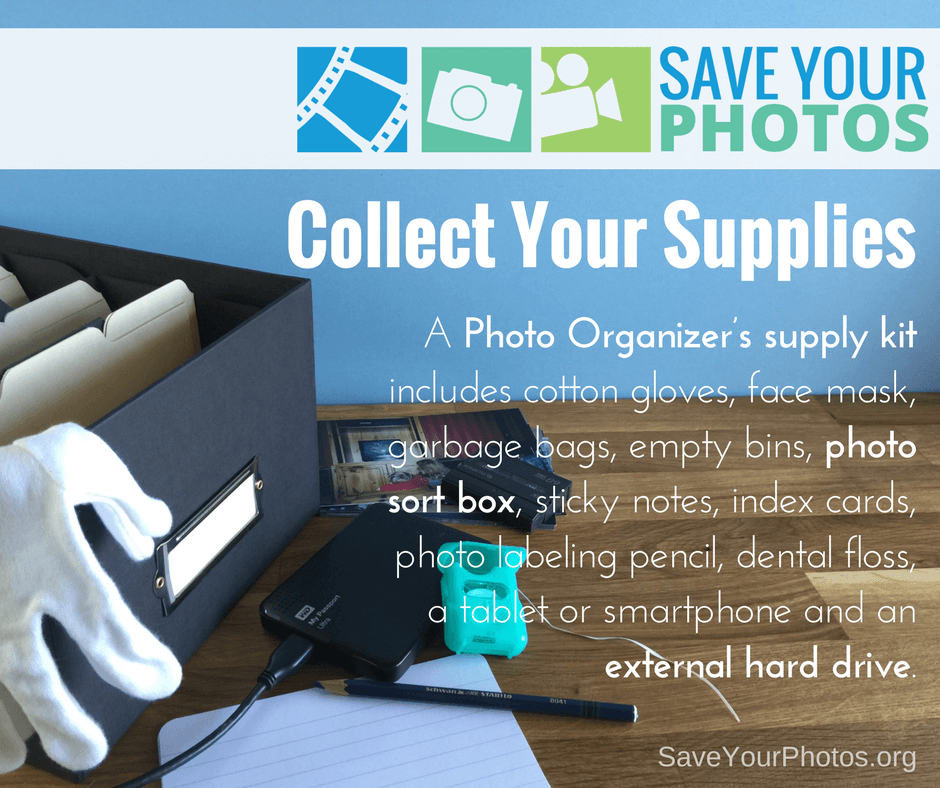
The proper photo organizing supplies are an important part of your photo organizing project. A Photo Organizer’s kit includes many different items that make the job of handling, identifying and storing your precious lifetime of photos.

Save Your Photos: Collect Your Photo Organizing Supplies | SaveYourPhotos.org


What the Experts Use

Before you get down to the business of organizing your photos, you’ll need to collect some photo organizing supplies. We polled Professional Photo Organizers for their supply list; these are the ‘must haves’ when they begin any photo organizing project.

Cotton Gloves

Fingertips contain an oily residue that will further deteriorate your delicate photo.

Face Mask

If your printed photos smell musty, or they were stored in an attic or basement they may contain mold spores that you could find irritating during the sorting process.

Gather these helpful #photo organizing supplies that the experts use. #saveyourphotos Click To Tweet

Soft-lead Blue or Black Art Pencil

As you sort photos you may want to include a date, year or name on the back of a photo. This pencil is not permanent, and will not indent or harm your photo until you can capture the details digitally once scanned. Never use a pen to mark the back of your photo.

Index Cards

Jot down more details, facts, stories and dates on index cards and group them with printed photos. Index cards can be scanned with printed photos, so important details remain grouped together.

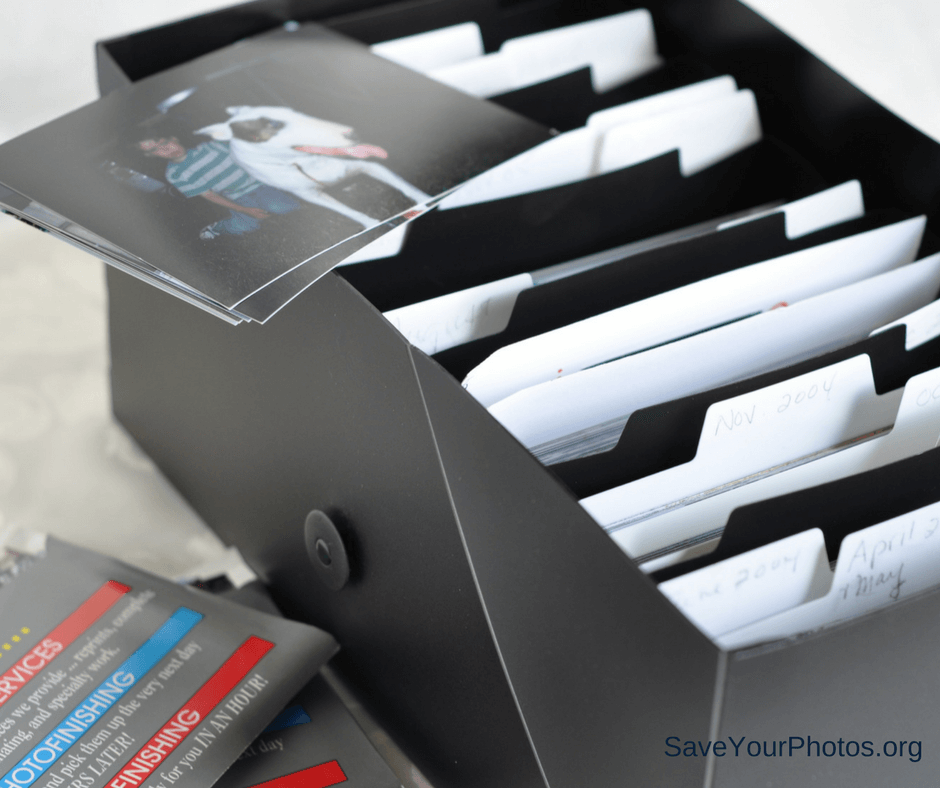
Archive Quality Photo Safe Storage Box

Choosing a good quality photo box will keep your photos safe, and aid in the sorting process.

Save Your Photos: Collect Your Photo Organizing Supplies | SaveYourPhotos.org

Dental Floss and Hair Dryer

If you have peel and stick albums, some of your photos may be difficult to remove.

Smartphone Camera

If you have old albums with details on the page, you can take a snapshot of the page to keep the details with the photos.

Sticky Notes or a Notebook

These come in handy for creating a timeline during the sorting process.  Some organizers use apps like Evernote or OneNote to curate information or create timelines.

External Hard Drive

Choose a high capacity drive according to the amount of images you have.

Garbage Bags

You’ll come across toss-away pictures, artwork and meaningless ticket stubs that will help reduce your clutter. Let’s set a goal to fill a bag!

These are the essentials, but you may have some more ideas too. Whatever makes your job easier, add it to the list.

What are your must-have photo organizing supplies?


Sign up today for more great photo organizing tips directly in your email box.

We also invite you to visit our sister blog The Photo Organizers for more tips and in-depth knowledge from some of the top photo organizing industry professionals. To find a photo organizer near you, visit the Association of Personal Photo Organizers.

Written by Andi Willis · Categorized: Photo Organization · Tagged: appo, photo organiser, photo organising, photo organizer, photo organizing, photo supply kit, photo tool kit, photo tools, save photos, save your photos

Aug 04 2017

Don’t Let Great Memories Fade Away

Don’t Let Great Memories Fade Away

Rick Voight of Vivid-Pix™ reminds us to not let our memories fade away.  Vivid-Pix™ is a proud sponsor of 2017 Save Your Photos Month.

Don't Let Your Memories Fade Away | SaveYourPhotos.org

Our memories make us who we are.

Our memories are the stories of us. They’re the bridge to our past that links us to our grandparents, parents, siblings, children, grandchildren, and friends. Like treasured heirlooms, our memories teach us that the bonds of family and friendship need to be cherished above all else. Sharing those memories enriches our life by bringing us closer to our loved ones.

Memories cannot be replaced, but they can be revived.

Those photographs lying in a shoebox are memories waiting to be revived, relived, and shared. That old photo album collecting dust might have an irreplaceable picture of your daughter playing with her dolls; or that memorable picture of you and your college roommates the day you all moved in. These amazing memories deserve a second chance.

Breathe new life into old memories by reviving & restoring your #photos to their original splendor. @VividPixFix Click To Tweet

Restore, revive, keep and share your precious memories easily.

Breathe new life into old memories by reviving and restoring your photos to their original splendor. With a wide range of services and programs available, the process of restoring old photos is not as challenging as you think. Just take it one step at a time.

Don't Let Your Memories Fade | SaveYourPhotos.org

Gather

Gather all your photos from those boxes and photo albums. Don’t forget any photos stored digitally on old computers or laptops. Start by gently removing any dust or dirt from your photos with a soft cloth.

Don't Let Your Memories Fade | SaveYourPhotos.org

Organize

Think about how you want to organize your photos. You can group them by date or event, family members or vacations. There are lots of ways to organize your collection. Choose a system that works for you and create stacks of your photos accordingly. If this sounds like too much, check out APPO.org, where you can search for a professional to help you organize your entire photo collection.

Scan

Now it’s time to digitize your photos by scanning them. You can scan several photos at once on your printer’s scanner. Or use an app such as Shoebox from Ancestry.com on your phone. (If you’re using your phone to scan, remember to scan photos in a room with lots of natural light.) You can also just delegate this process to a local store or a scanning service like Scanmyphotos.com, which scans, crops, edits and archives your photos.

Don't Let Your Memories Fade | SaveYourPhotos.org

Restore

After your photos are scanned, the next step is to restore their vibrancy. With innovative photo correction software like Vivid-Pix™ RESTORE Picture-Fix, enhancing and refining your old photos is as easy as 1, 2, 3. You can restore color and clarity with just one click. And what’s more, RESTORE also improves on the built-in enhancement software in scanners and scanning services.


So relive and celebrate those unforgettable moments once again by converting your slide and print photos to digital images. Revive their vivid color and clarity and store them securely, so you can share them with family and friends–and continue to enjoy them for years to come. Just as memories stand the test of time, now your treasured pictures will, too.


Sign up today for more great photo organizing tips directly in your email box.

We also invite you to visit our sister blog The Photo Organizers for more tips and in-depth knowledge from some of the top photo organizing industry professionals. To find a photo organizer near you, visit the Association of Personal Photo Organizers.


Rick Voight of Vivid-PixRick Voight is a lifelong snapshooter, who has been in the imaging business for a few decades. “Rick, Randy, and a few excellent people” created Vivid-Pix™ to make it easy for customers to get and share better photos. Vivid-Pix patented and proprietary software’s follow the slogan created a century ago – “you press the button, we do the rest”.
At HP, Rick helped create the Retail Publishing Solutions division – connecting home, store and online – delivering photos and gifts in minutes, in an hour, and in a few days. At Kodak, he enjoyed working with just about every class-of-trade, developed relations and promotions with local, regional, national, and international sporting teams, theme parks, and organizations; creating new technologies and revenues.

Rick is a volunteer and board member working with multiple non-profit organizations.

Vivid-Pix | Save Your Photos Month 2017 Sponsor


Don't Let Your Memories Fade | SaveYourPhotos.org

Written by Andi Willis · Categorized: Photo Organization · Tagged: how to organise photos, how to organize photos, photo organising, photo organizing, photo restoration, save your photos, Vivid-Pix

Jul 19 2017

Save Your Photos: Get Set Up for Success

Save Your Photos: Get Set Up for Success

Any good organizing project starts with a good workspace and a plan. This week we are discussing how to find a great workspace to ensure your photo organizing project is set up for success.

Save Your Photos: Set Up for Success | SaveYourPhotos.org

Set Up for Success: Find a Work Space

Let’s get down to business. Remember the saying “out of sight, out of mind”? Depending on the size of you photo collection, you may be working on this for a while. (And you probably have a lot of photos because, remember we are all overwhelmed!) If everything is tucked away or hidden in closets and on computers, it will be easy to forget. You’ve made a commitment to organize your photos, so let’s get them into an area where you can work on them.

Set yourself up for #photo #organizing success with a great workspace. Click To Tweet

Designate a temporary workspace in your home that is visible and allows you to spread out. A large table in the corner of a room or a separate room is ideal and causes the least amount of disruption. When you’re project is visible, you’re more likely to remain focused on completion.  If you set yourself up on your dining room table, then you may have to pack it up again when you want to sit the family for dinner! If space is an issue, take a photo of the locations where your photos are stored so you can create a vision board of what you are dealing with.

Save Your Photos: Set Up for Success | SaveYourPhotos.org

Set Up For Success: Hunt and Gather

Next, gather your memory collection into your workspace. Locate all photo albums, loose printed photos, memorabilia, kids artwork, negatives, slides, undeveloped film, memory cards, family artifacts, home movies (ex. VCR tapes, miniDV’s, film, etc.). Determine the devices where you have photos stored, such as your smartphone, computers, and tablets. Resist the temptation to start sorting yet or reminiscing! There will be time for that later.

Ready, set, GO!


Sign up today for more great photo organizing tips directly in your email box.

We also invite you to visit our sister blog The Photo Organizers for more tips and in-depth knowledge from some of the top photo organizing industry professionals. To find a photo organizer near you, visit the Association of Personal Photo Organizers.

Written by Andi Willis · Categorized: Photo Organization · Tagged: digital photos, organising photos, organizing photos, photo organizing, photo preservation, photo solutions, print photos, save photos, save your photos, workspace

  • 1
  • 2
  • Next Page »

© Copyright 2017 Association of Personal Photo Organizers · All Rights Reserved · Privacy Policy