
Save Your Photos

  • Home
  • Blog
  • Disaster Help
    • Disaster Resources
    • Hurricane Harvey Photo Recovery
    • Hurricane Irma Photo Recovery
  • Who We Are
    • Save Your Photos Group
    • The Photo Organizers Blog
    • Association of Personal Photo Organizers
  • Sponsors
    • How To Become A Corporate Sponsor

Jan 03 2018

Save Your Photos: Scan Your Pictures

Save Your Photos: Scan Your Pictures

Scanning your printed photos and slides extends the lifetime of your pictures, creates a backup, and increases your ability to share and enjoy your memories.

Save Your Photos: Scan Your Pictures | SaveYourPhotos.org


Now that your analog collection is organized (or at least in progress), it’s time to get some or all of these treasures scanned.

Why Scan Your Pictures?

Scanning extends the lifetime of your photo.

Your printed photos are decaying and deteriorating even under optimum storage conditions. When you make a digital copy, you have the ability to enhance the image, restore it to its original color and fix damaged any damage. Digital photos can be migrated into new forms as technology changes, extending the life of your image beyond the original print.


Scanning creates a backup of your printed images.

Right now, you have one copy of those prints with no backup unless you were particular about saving and cataloging your negatives. Your digital copy will be stored in your digital photo hub with the rest of your digital images, and will get backed up during your normal workflow.


Scanning increases your ability to share and enjoy your photos.

Families with printed photos face similar dilemmas. How will I divide my printed photos between my kids? Who gets what? What if they have storage space issues? I created scrapbook albums, and everyone in my family wants one! When you have digital copies of your photos (and your albums), your problems are solved. In their digital form, your printed photos can be shared via social media and online photo archives or put into slideshows and photos books.
 

Save Your Photos: Scan Your Pictures | SaveYourPhotos.org

How To Scan Your Pictures

Begin by reviewing your printed photos and slides and determine the quantity now that you have purged during the organizing process. Consider how you want to use these digital images so you can determine the minimum DPI that you need your images scanned. We recommend a minimum of 600 DPI depending on the original size of your image, and what you intend to use it for. For example, a 2×3 photo that you want to display on your wall as a canvas print may need scanning at a much higher DPI. If you are scanning slides, your DPI will be considerably higher and will be determined based on the end goal for your digitized copy. Work with your scanning service provider to help determine your needs.


Will you scan at home or use a service?

Local and online scanning services are an excellent choice for time-starved individuals and can be an affordable solution if you don’t have a quality scanner at home. Look for service providers that offer image enhancement and white glove service. Some big box stores ship your photos out of the country for processing. Do your homework!

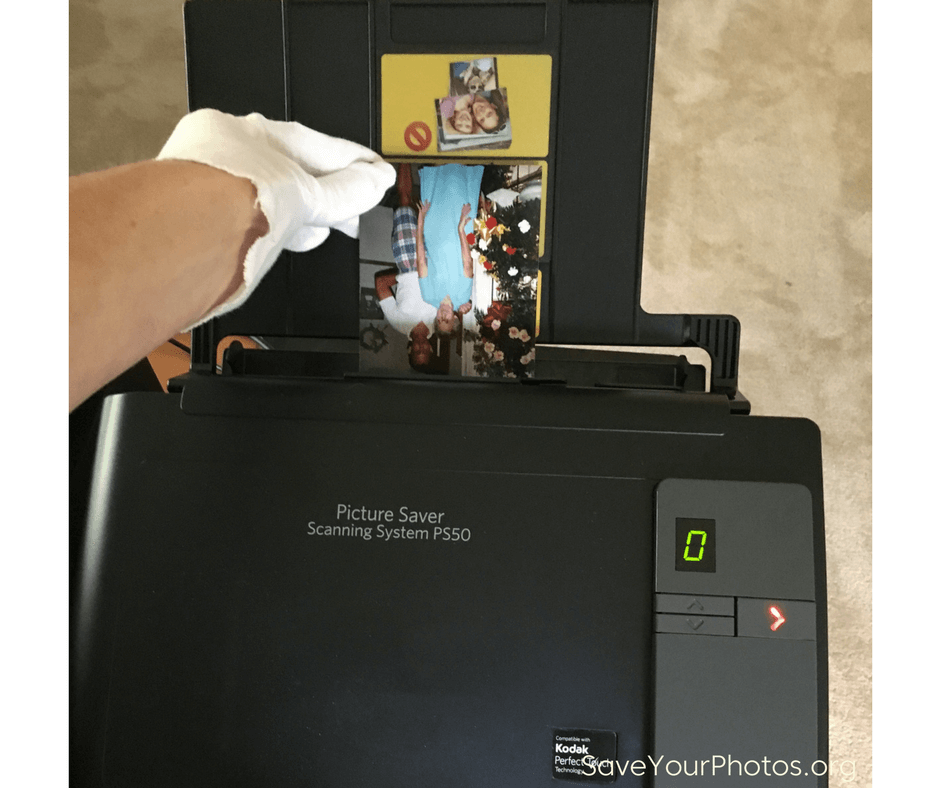
If you scan your pictures at home, take extra care when handling your photos. Wipe your printed photos with a clean cloth and keep the scanner glass clean and dust free. Scanners will pick up dust, scratches, and smudges and magnify them in your image.

Do you have thousands of photos to scan? Consider buying a high-speed scanner or better yet, rent one. A high-quality, high-speed scanner can process your scans at an average of 50 prints per minute depending on the scanner. That’s roughly 2,000 – 3,000 photos per hour. Choosing a high-speed scanner for large jobs saves you time and money. Google ‘rent a scanner’ to find a scanner that suits your needs and budget.


Sign up today for more great photo organizing tips directly in your email box.

We also invite you to visit our sister blog The Photo Organizers for more tips and in-depth knowledge from some of the top photo organizing industry professionals. To find a photo organizer near you, visit the Association of Personal Photo Organizers.

Written by Andi Willis · Categorized: Digitizing · Tagged: how to scan photos, scan photos, scan pictures, scanning

Sep 22 2016

No Picture? No Proof? Photos Capture The Stories of Our Lives

No Picture? No Proof? Photos Capture The Stories of Our Lives

This is a Guest Contribution by Lori Krause, Photo Life Manager, and member of the Association of Personal Photo Organizers.

No Picture? No Proof? | SaveYourPhotos.org


No Picture? No Proof?

Now that’s a loaded statement! And can be interpreted a couple of different ways. But we’ll get back to that in a minute. First, let’s talk about why we take pictures.

Or why I take pictures.

I am not a professional photographer, far from it! I don’t know my aperture from my aspect ratio, much less anything about shutter speed. What I do know is that I’ve always enjoyed capturing important people and moments in my life through photography. But until about 6 years ago, I didn’t realize that I was also capturing proof.

The 50th Wedding Anniversary

In 2010, my in-laws were celebrating their 50th wedding anniversary. I was asked to scan their family pictures and slides so the siblings could put together a video for the celebration party.  While I was at it, I also scanned all of my pictures as well. How many times have you found a picture and thought, “Oh my goodness, I had forgotten all about . . . ?” I had a lot of those moments!

Like, “Oh, wow! There’s my husband heading to a fishing tournament in a sweatshirt he printed with one of the first color printers!”

The sweatshirt

or “Look, there’s the picture of my goofy son who won first place in a baby contest.”

The winning photo!

But it wasn’t enough for me to remember those moments, I wanted the ability to find those pictures and share the moments with others. So, while I was scanning, I also set up a system in my computer to organize, the now thousands, of photographs. I can pretty much find any picture within a couple of minutes.

OK, so I can find the pictures quickly, but what stories do they tell? What are the memories and how can I share them today?

If there is no picture, is there no proof? #saveyourphotos Click To Tweet

Yesterday’s Memories Shared Today

When that sweatshirt (the one mentioned above) was found and my college daughter quickly declared it was hers, I could show her the picture of her dad wearing it almost 30 years prior.  As my son was moving out and came across a little trophy, I could show him the picture that helped him claim that trophy 25 years ago.

krause-1
                                          The “sweatshirt resurrected!”


I also have recently captured memories as well.

krause-4
   Sitting in the last row (who knew there was a row ZZ?) for the 2012 MLB All Star Game.


Remember that 50th Anniversary party that started it all? Over 100 friends and family came from all over the country for a surprise dinner to celebrate them. I made my in-laws a photo book to commemorate the weekend. (I’ve since made a photo book for almost every family vacation and holiday as well.) When my daughter graduated high school and wanted certain pictures for her page in the yearbook, I was able to find them easily. For Christmas gifts each year, I make calendars for my parents highlighting pictures of the grandkids, and they love them! It’s important to organize those pictures so you can find and relive those memories captured on film.

I’ve heard it said that a birth certificate proves you were born and a death certificate proves you died but a photograph proves you lived. So, no picture, no proof!


Sign up today for more great photo organizing tips directly in your email box.

We also invite you to visit our sister blog The Photo Organizers for more tips and in-depth knowledge from some of the top photo organizing industry professionals. To find a photo organizer near you, visit the Association of Personal Photo Organizers.



No Picture? No Proof? | SaveYourPhotos.org


Lori Krause, Photo Life Manager


My name is Lori Krause. I live in a suburb of Kansas City with my husband of 28 years and a recently adopted dog who keeps me on my toes. We have 2 amazing human kids: one working on becoming a certified cicerone (beer expert) and one in college studying sports marketing.

I’m a non-practicing registered nurse. I’ve been in some sort of nursing since 1981. I love nursing, but healthcare is changing. I also love taking and organizing pictures. I had no clue I could transition careers so easily! As a nurse, I looked at the whole patient and evaluated what I could do to help and care for the patient. As a Photo Life Manager and member of APPO, I evaluate all of the client’s needs and help them care for their photographs.


Written by Jackie Lyals · Categorized: Creating Memories · Tagged: digital photos, photo organizing, save photos, scan photos, scanning

© Copyright 2017 Association of Personal Photo Organizers · All Rights Reserved · Privacy Policy