Save Your Photos

  • Home
  • Blog
  • Disaster Help
    • Disaster Resources
    • Hurricane Harvey Photo Recovery
    • Hurricane Irma Photo Recovery
  • Who We Are
    • Save Your Photos Group
    • The Photo Organizers Blog
    • Association of Personal Photo Organizers
  • Sponsors
    • How To Become A Corporate Sponsor

Jun 13 2015

Welcome to Our New Site!

Welcome to Our New Site!

We are so excited to be launching our new site today!  Several volunteers have spent countless hours working together to make this new site a place where you can come to learn more about saving your photos.
Save Your Photos

Here’s how to get started on the new site:

  1. Mark your calendar for the 2nd Annual Save Your Photos Day Event on September 26, 2015.
  2. Learn more about the Save Your Photos Day Event and Register Your Event if you are holding one.
  3. Sign up for our Email Newsletter to keep up to date on new event locations as they are added along with other news.
  4. Learn about the Save Your Photos Alliance, meet the Alliance Members and Join the Alliance!
  5. Check out our Resources page to learn how you can Safeguard/Backup, Restore, Recover and Reunite photos.
  6. Stop by the Media page to read stories about how others are saving their photos.
  7. Finally, head over to the Blog.  We have lined up some awesome contributors who will be sharing their photo stories and giving you helpful tips and advice on saving your photos.

Get Social With Us. We’d Love to Connect With You!

  • Facebook
  • Pinterest
  • Instagram @savephotosday
  • Twitter @savephotosday

Thanks for stopping by.  We hope that you will join us on our mission to help the world save their photos!  We’d love to hear your feedback on the new site in the comments below.

Written by Mary Moseley · Categorized: Uncategorized

Jun 12 2015

House Fire Made Us Realize Value of Photos

House Fire Made Us Realize Value of Photos

This is a guest contribution from Alice Boll at ScrapbookWonderland.com.

2016 will mark a 20 year anniversary that I will not be celebrating. In 1996 my husband (then fiance) and I had a fire in our house.

Photos House Fire

We were young and living in our first home. It was a very small house, less than 500 sqft on the main level with a sloped roof second story with two very small bedrooms and a bathroom.

One day after making supper we took our dog for a walk and went to Gramma’s house. I answered the phone at her house and the caller asked, “Does one of the Boll boys still own that house on the corner of town?”

“Yes.” I answered curiously, knowing that was my house.

“It’s on fire.”

The caller never identified themselves to me. At the same time my husband’s cell phone rang. It was the neighbor calling to tell us that our house was on fire.

We borrowed Gramma’s car and drove to our house. A crowd was gathering and the firemen were trying to hook up to the water supply. After awhile I noticed that I had forgotten to put on my shoes!

There are no words to describe the horror of watching smoke billow from your house and seeing flames through the window.

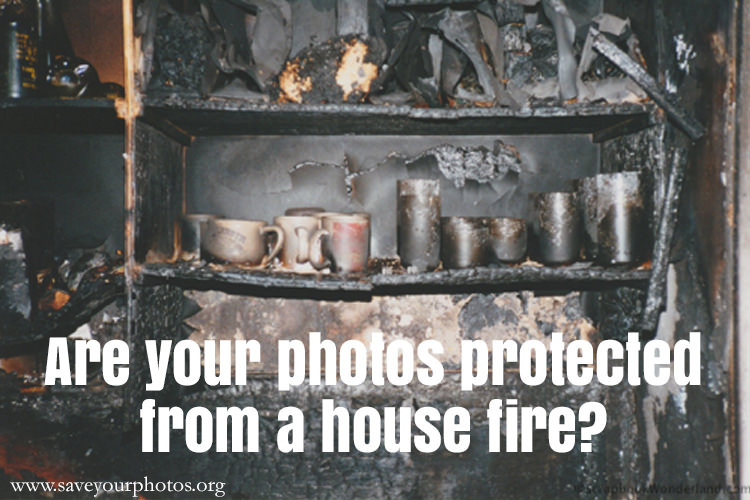
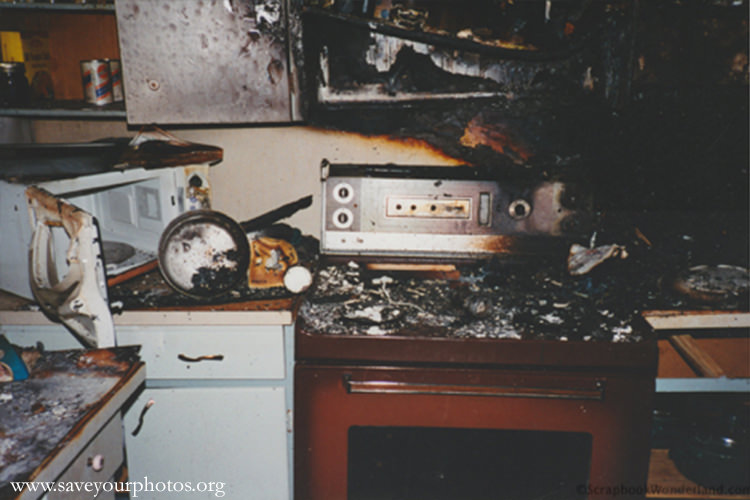
Eventually the fire was stopped. It had started in the kitchen from a short in the back of the stove. The kitchen was destroyed from the waist up. The rest of the house suffered severe smoke and water damage. The house had been so hot that water dripped down the walls leaving sooty trails behind. Actually everything was covered in black soot.

House Fire Save Your Photos

The smell inside the house was awful. When you think of a fire you imagine the smokey scent of a campfire, but a house fire is different. The smell of burning paint, plastic, and other household items does not leave you with a pleasant memory.

And then…

It always seem to get worse before it gets better.

Our house was boarded up for the night and we stayed at Gramma’s. The next morning we discovered that our house had been looted. People broke in and stole our smoke damaged belongings.

In the end we were lucky.

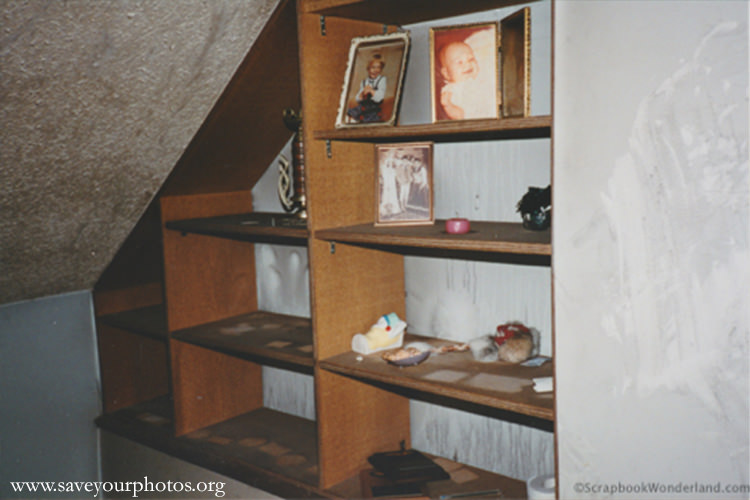
Most of our home had survived. Most of our belongings were still there. Severely damaged, but there. Since we were young we did not have many photo albums, and although they were smoke damaged they survived quite well. The photos in frames around the house were not as lucky. The pictures melted to the glass and were ruined by the heat and humidity.

House Fire Photos in Frames

We lost some treasured possessions, but came through the ordeal safe and with a new understanding of how precious our photos and memorabilia were to us.

My advice to you is to back up your photos off site. If you house is destroyed you can lose everything. It’s also much easier to complete an insurance claim when you have records of your belongings. Take photos of the inside of your closets and cupboards.

I’m lucky this happened early in my adult life. I have learned some valuable lessons and I hope that our precious memories and photos will be safe, no matter what the future may bring.

Alice Boll Profile
Alice Boll

Alice is married and has two teenage sons that work their hardest to be complete opposites of each other. She loves swimming and spends her summers coaching swim club. For the other 8 months of the year, also known as winter in Canada, she’s curled up by a cozy fire enjoying her favourite activity, scrapbooking, eh! You can find Alice sharing tips, tricks and techniques at ScrapbookWonderland.com.  Let Alice show you how to share your memories in a creative way!


We would love to hear your stories about how you have either saved photos from a fire or how you safeguard your photos from fire.  Please share in the comments below!


Written by Mary Moseley · Categorized: Safeguard

Jun 05 2015

How to Restore Your Old Photos

How to Restore Your Old Photos

This is a guest contribution from Melissa Shanhun at Digital Scrapbooking HQ.

Restore Old Photos

Take a minute to think about the photos that have surrounded you for years. There’s that faded print that’s been hanging on the wall – stuck to the glass of it’s frame. There’s the precious dog-eared photo kept in a wallet for many years. There’s the inherited photos so old and worn you can barely see a thing.

Wish you could restore those photos to their former glory?

For many of us saving our photos is more than just storing them away in archival boxes. If you are reading this post, it’s likely that you have a collection of photos that don’t existing in digital form and the negatives are long gone.

If you have a degree in archives management you may know the best way to restore these gems, but if you are like most of us, you are not going to be trying the infamous dental floss trick on your parent’s last surviving wedding portrait. The great news is that modern technology (namely, Photoshop Elements) can help you without worrying about ruining anything.

Here’s the simple steps I follow to restore those precious photos:

1 Digitize the Photo

Scan your photos, or use a tripod to get a clean square, high resolution image with your camera.

2 Restore the image

Photoshop Elements makes it easy to restore your images. It’s a one off purchase and will save you thousands compared to going with pro photo restoration and retouching.

The latest versions have a guided edit mode that steps you through the process of restoring your photo. It gives you a mini tutorial for each step so there’s no confusing jargon or missed steps.

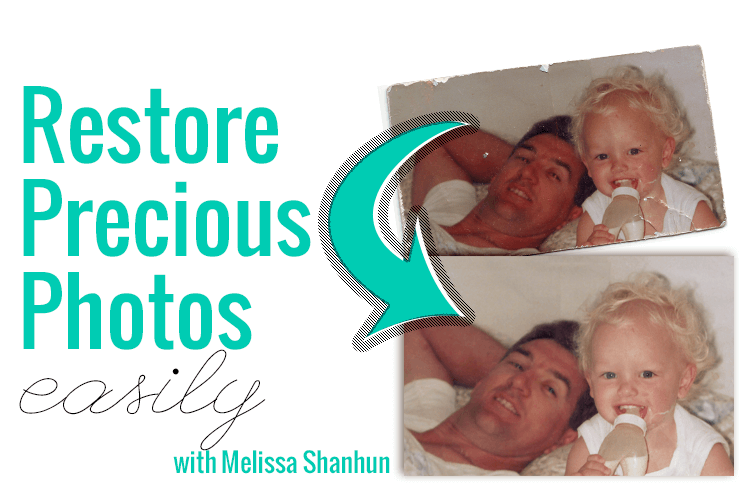
Here’s a quick demonstration of a photo I restored in Photoshop Elements in just a couple of minutes.

Quick Steps to Restoring a Photo

  • Open the Photo you want to work on in Photoshop Elements.
  • Click File – Save as to save your original photo as a PSD file so that you can edit the layered file later.
  • Press Ctrl+J (or Cmd+J on the Mac) to duplicate your original photo so that you can compare before and after (and easily return to your original photo in case you need to!)
  • Click on the Guided Edit button at the top of the screen and select Restore Old Photo. Just work from top to bottom following along as Photoshop Elements suggests to get the best results.
  • Crop: With an old photo, you often have messy edges that you will want to crop off. Click and drag the corners to adjust your crop, and click the green checkmark to commit to the crop.
  • Heal: The Healing Brush tool allows you to fix bigger cracks and tears.
  • Adjust: You can improve the color and contrast of your photo using the Auto Correct buttons.
  • Save your work.
  • To print your final copy – Save it as a high resolution JPEG.
  • Upload to your favourite photo printing service.

I certainly don’t restore every photo I scan, but those precious few? I enjoy spending a couple of minutes working with them. It makes my heart happy to see those photos shine again!

Display and enjoy!

My favourite ways to enjoy my photos are using a slideshow on my desktop computer and printing 8x10s for framing. I know many people also love digital photo frames for the ability to rotate through their favorite images.

Melissa1


Melissa-2013 crop

Good day, I’m Melissa, Aussie mum, digital scrapbooker, professional organizer and teacher. I love pairing photos with memories of meaningful moments in my everyday life. Here in Perth, I spend my everyday life with my husband, Phill, and our three little ones: Emily, Edward and Lucy. Digital scrapbooking helps me tell the stories in our life. At Digital Scrapbooking HQ, I would love to introduce you to the joy of scrapbooking with your computer. I’ve been teaching and working with Adobe Photoshop Elements for many years, and my former career in education gives me the unique blend of skills needed to teach the technology skills, without the stress and fuss. Find out more here.

Written by Mary Moseley · Categorized: Restore

  • « Previous Page
  • 1
  • 2
  • 3
  • 4

© Copyright 2017 Association of Personal Photo Organizers · All Rights Reserved · Privacy Policy